🚨 MALWARE EXPLOIT ALERT: Fake “Google Antigravity” Dev Tools Draining Wallets
Category: Scam Alerts and Preventive Education
Threat Level: Critical 🔴🔴
Target: Web3 Developers, AI Enthusiasts, Windows Desktop Users
The ShieldGuard Threat Intelligence team is issuing an emergency warning regarding a highly sophisticated malware campaign targeting developers. Attackers are capitalizing on the hype surrounding Google’s newly launched AI coding tool, “Antigravity,” to distribute devastating info-stealers.
If you or your development team recently downloaded this tool, your crypto wallets, session cookies, and local data may be actively compromised.
Here is the complete intelligence breakdown of the Antigravity malware campaign and the critical operational security (OpSec) needed to protect your digital assets.
🔍 Threat Intelligence: Anatomy of the Attack
This is not a crude phishing attempt. The attackers are using a highly refined supply-chain and typosquatting strategy.
1. The Attack Vector: Typosquatting the Hype
Google launched the genuine Antigravity tool in November 2025 at antigravity.google. Knowing that developers rarely memorize new, obscure URLs, attackers registered a hyphenated lookalike domain: google-antigravity[.]com.
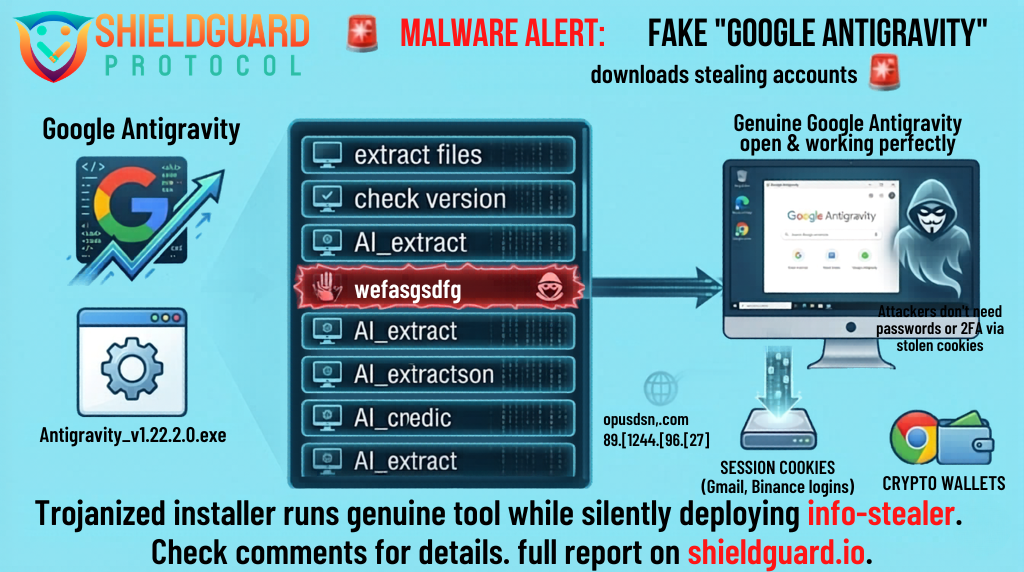
When users visit this fake site, they download an installer named Antigravity_v1.22.2.0.exe. This 138 MB file actually contains the genuine Google software.
2. The Execution: The Invisible Passenger
Because the installer contains the real software, it installs cleanly. A desktop shortcut appears, the application opens, and everything works perfectly. The user has no reason to suspect a breach.
However, the attacker repackaged the installer to include a single, hidden malicious command. During the installation process, a PowerShell script quietly opens a connection to a remote command-and-control server (opus-dsn[.]com) and asks for further instructions.
3. The Payload: Blinding Defender & Stealing Data
If the attacker’s server decides your machine is a valuable target, it executes a devastating three-step attack:
- Blinding Security: The script alters Windows Defender settings to ignore specific folders and file types (like
.pngfiles), effectively blinding your system’s antivirus. - Hidden Persistence: The malware disguises itself as a fake Microsoft Edge update file (
C:\ProgramData\MicrosoftEdgeUpdate.png) and creates a scheduled task to run silently every time you log in. - The Info-Stealer: The payload executes a powerful .NET stealer. This malware rips through your system, hunting for and extracting:
- Cryptocurrency wallet files
- Saved passwords and autofill data (credit cards)
- Discord tokens, Telegram sessions, and Steam logins
- Session Cookies: This is the most critical threat. Stolen session cookies allow attackers to bypass passwords and 2FA to walk straight into your email or exchange accounts.
The malware even includes tools for “hidden desktop” tradecraft, allowing the attacker to create an invisible second screen on your computer to approve transactions or manipulate your accounts while you work.
🛑 The Hard Truth: Session Cookies Bypass 2FA
Developers often believe they are safe because their accounts are secured with Two-Factor Authentication (2FA) and hardware keys. This attack bypasses those protections.
By stealing your active session cookies, the attacker does not need your password or your 2FA code. To the website (whether it’s Gmail, Binance, or GitHub), the attacker’s connection looks exactly like your currently logged-in session. The gap between infection and total account takeover can be measured in minutes.
🛡️ Preventive Education: Defending Your Dev Environment
If you are a developer or power user downloading the latest AI tools, you must upgrade your OpSec:
1. Isolate Your Environments
Never use your primary crypto machine to test new, unverified software. If you must download a new tool like Antigravity, run it inside an isolated Virtual Machine (VM) or a dedicated, sandboxed laptop that does not contain your main wallets or critical browser sessions.
2. Cold Storage is Mandatory
Do not store significant crypto holdings in software wallets (browser extensions or local desktop apps) on your daily-driver computer. Your core portfolio must be secured by an air-gapped hardware wallet. Even if an info-stealer infects your machine, it cannot extract keys stored offline.
3. How to Respond to a Suspected Infection
If you downloaded Antigravity from anywhere other than the official Google URL, you must assume your machine is compromised.
- Do not use the infected machine to change passwords.
- From a clean device, immediately use the “sign out everywhere” option on all critical accounts (Google, Microsoft, Exchanges, Discord).
- Rotate all passwords and revoke any API/SSH keys stored on the infected machine.
- Move any remaining crypto funds to a new, clean wallet immediately.
- Wipe and reinstall Windows entirely. The machine cannot be trusted.
💡 The ShieldGuard Verdict
The Antigravity campaign proves that threat actors are highly sophisticated. They aren’t building fake software; they are hiding inside the real thing. If you are chasing the latest AI tools, you are walking into a minefield. Verify your URLs, isolate your development environments, and assume any local file can be extracted.
Stay Verified. Stay Shielded.