🚨 THREAT INTEL: The Invisible Exploit – How Rootkits Drain Crypto Wallets
Category: Scam Alerts and Preventive Education
Threat Level: Critical 🔴🔴
Target: Desktop Wallet Users, DeFi Traders, Web3 Developers
Welcome to the special agents of the malware world: rootkits. If you are securing your own crypto assets, understanding this threat is non-negotiable.
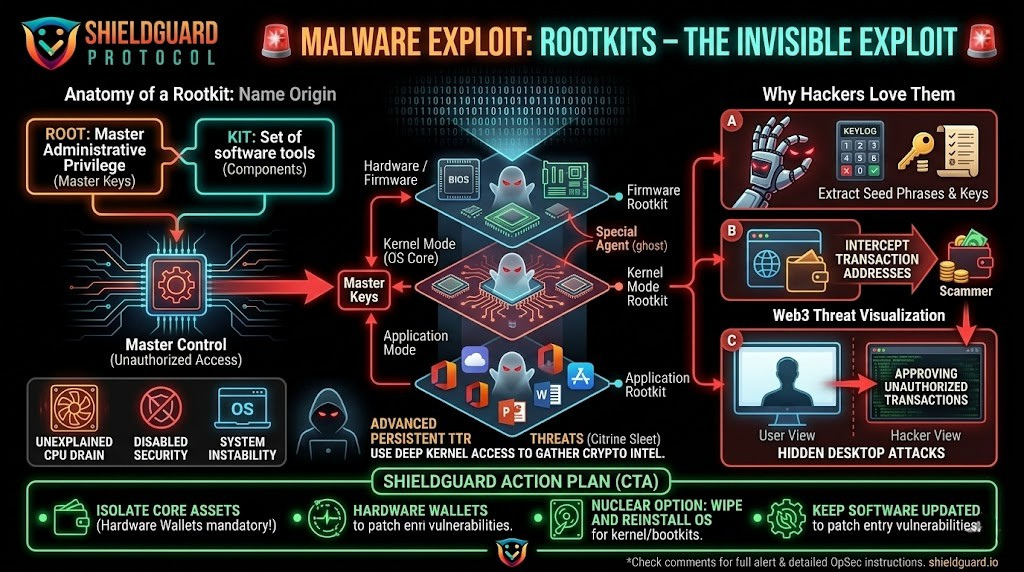
Rootkits are a clandestine group of computer programs designed to sneakily enter and hide in your machine. Here they “live” safely concealed from users and system processes while granting hackers privileged access to the targeted device. The name is a blend of two words: “root” (the highest administrative privilege in Unix/Linux systems) and “kit” (the software components that allow this unauthorized access). In other words, rootkits provide hackers with master keys to the heart of your system.
Once embedded, they open a virtual backdoor. For Web3 users, this means the attacker can remotely log your keystrokes to steal your seed phrases, intercept your network traffic to alter transaction addresses, or deploy hidden secondary payloads.
🔍 The Web3 Threat: Why Hackers Use Rootkits
Rootkits are increasingly the weapon of choice for advanced persistent threats targeting decentralized finance.
- Direct Asset Theft: State-sponsored hacking groups are actively deploying advanced rootkits specifically to target cryptocurrency wealth. For example, the North Korean threat actor group “Citrine Sleet” utilizes the advanced FudModule rootkit to gain deep kernel-level access to Windows machines, a tactic explicitly designed to gather the information necessary to take control of a victim’s cryptocurrency assets.
- Cryptojacking: Many rootkits act as invisible shields for malicious cryptominers. They hide the mining software that secretly drains your device’s processing power and electricity to mine cryptocurrency for the attacker, silently wearing down your hardware.
- “Hidden Desktop” Attacks: As we have seen in recent exploits, rootkits can create invisible secondary desktops. The attacker operates inside that hidden environment—approving wallet transactions or signing malicious smart contracts—while your real screen shows nothing unusual.
🧬 The Rootkit Family
Not all rootkits are created equal. They are categorized by how deeply they infect your machine:
- Bootloader Rootkits (Bootkits): These replace your authorized bootloader (the mechanism that loads your OS when the computer is switched on). The rootkit activates before your computer’s OS is even fully loaded, effectively owning the machine from the moment you hit the power button.
- Hardware/Firmware Rootkits: Installed directly onto the hard drive, router, or system BIOS. Instead of manipulating your OS, these affect the device’s physical firmware, allowing them to easily hide from standard antivirus software and log every keystroke you make.
- Application Rootkits: These replace legitimate files in everyday programs (like browsers or desktop crypto apps). Every time you open the infected program, the attacker gains access.
- Kernel Mode Rootkits: These strike at the very core of the computer system. Hackers use them to alter the OS’s functionality, making them the most serious and devastating type of rootkit.
- Memory Rootkits: These burrow into your computer’s RAM to execute attacks in the background. Because they live in active memory, they usually disappear when the system is rebooted.
🪤 How They Infect Your Machine
Rootkits are “blended threats.” They cannot spread alone like a traditional virus; they need a delivery mechanism. The hacker must successfully deploy a “dropper” (to import the file) and a “loader” (to install it).
They usually trick you into letting them in via:
- Trojanized Software: Piggybacking on legitimate programs or fake Web3 tools downloaded from untrusted sources.
- Social Engineering: Phishing emails or direct messages on Telegram/Discord containing malicious links.
- Drive-By Downloads: Visiting a compromised website that injects malicious code in the background without you ever clicking a button.
Exploiting Vulnerabilities: Slipping through unpatched weaknesses in outdated operating systems or browsers.
🛑 Symptoms of a Rootkit Infection
Because they are designed to stay hidden, detecting them is notoriously difficult. However, if you notice these symptoms, your capital is at risk:
- Unexplained CPU Drain: Is your computer’s fan running loudly or is the machine overheating even when idle? This is a primary indicator of a rootkit masking a cryptojacker.
- Disabled Security: Your antivirus or firewall turns off on its own, or system settings and permissions change without your input.
- System Instability: Frequent crashing, freezing, or the dreaded “Blue Screen of Death.”
- Network Anomalies: Unpredictable web browsing speeds and excessive background network traffic.
🛡️ Preventive Education: The ShieldGuard Action Plan
If your machine is infected with a sophisticated rootkit, standard antivirus scans often will not save you. Here is the operational security required to survive this threat:
1. Isolate Your Core Assets (Hardware Wallets)
The ultimate defense against rootkits is cold storage. Do not store your primary crypto portfolio on a software wallet installed on your daily-use computer. If your core private keys are generated and stored offline inside a hardware wallet, a rootkit cannot extract them, even if your PC is fully compromised.
2. Boot in Safe Mode & Run Deep Scans
If you suspect an infection, restart your computer in Safe Mode. This prevents many rootkits from loading when the device boots, making them visible to deep, specialized offline antivirus scans.
3. The Nuclear Option: Wipe and Reinstall
If a deep kernel or bootkit has embedded itself in your system, attempting to manually delete files can destroy your OS. The safest and most definitive way to eradicate an advanced rootkit is to back up your non-executable files, completely wipe the hard drive (format it), and perform a clean installation of your operating system.
4. Eliminate the Entry Points
Prevention is your best weapon. Keep your OS, browsers, and all applications obsessively updated to patch the vulnerabilities rootkits use to enter. Never download unverified software, and treat all unsolicited DMs regarding crypto opportunities as hostile.
Stay Verified. Stay Shielded.