🚨 SCAM ALERT: FIFA World Cup 2026 Phishing & Mobile Malware
Security researchers at PhishFort and Check Point have issued an urgent alert regarding a surge in malicious activity targeting Web3 users during the 2026 FIFA World Cup. Attackers are leveraging the global excitement of the tournament to deploy sophisticated “Wallet Drainer” malware designed to empty retail crypto accounts.
How the Attack Unfolds
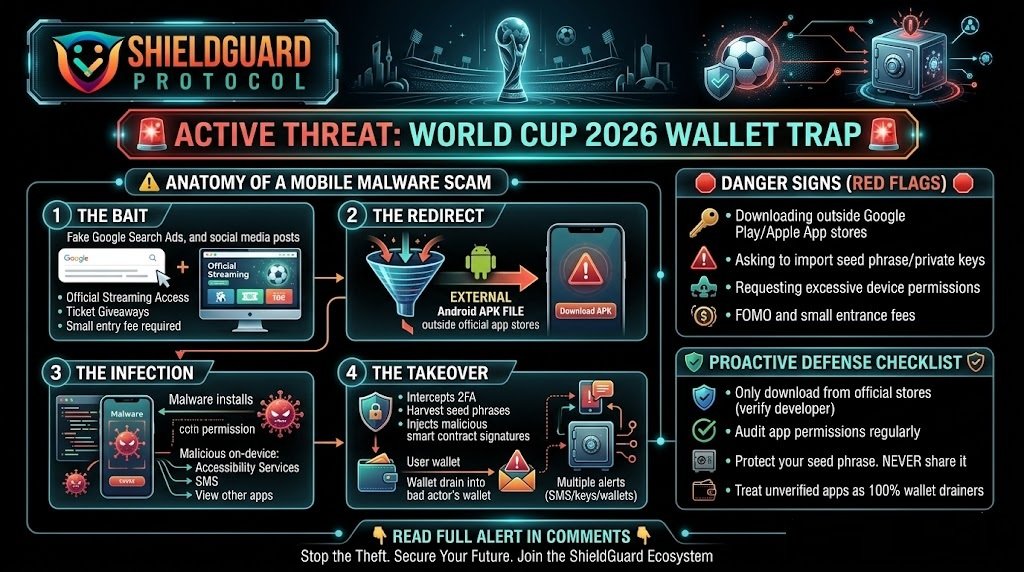
Scammers are utilizing a multi-stage social engineering process to bypass traditional security filters and reach ordinary users.
1.The Social Lure:Step 1.
Attackers promote “official” streaming access, betting pools, or ticket giveaways via social media groups and deceptive Google search ads. Some groups even charge a small “entry fee” (~$10) to build a false sense of exclusivity and legitimacy.
2.The Redirect:Step 2.
Once a user clicks the link, they are redirected to a professional-looking web application that requests they download a specialized “streaming player” or “betting app”.
3.The Side-Load:Step 3.
Instead of using official app stores, users are prompted to download and install an external Android Application Package (APK). This process, known as “side-loading,” bypasses the security checks built into the Google Play Store.
4.The Execution:Step 4.
Upon installation, the app requests deep system permissions. Once granted, the malware silently begins harvesting seed phrases, intercepting Two-Factor Authentication (2FA) prompts, and injecting malicious signatures into legitimate wallet apps.
Risk Assessment for Retail Users
| Threat Type | Impact on User |
| Credential Harvesting | Scammers steal your login details for exchanges and banks. |
| Wallet Drainers | Malicious code automatically transfers all crypto assets to the attacker’s wallet. |
| 2FA Interception | The malware “reads” your SMS or authenticator codes to bypass security. |
| Seed Phrase Theft | Attackers scan your device’s memory/clipboard to find your private recovery keys. |
🛡️ SHIELDGUARD LEARN: How to Protect Your Mobile Device
This campaign is specifically designed to exploit “side-loading” vulnerabilities on mobile devices. As an ordinary user, your best defense is a strict policy regarding how you install software.
1. Never “Side-Load” APK Files
Official apps for major events will always be listed on the Apple App Store or Google Play Store. If a website asks you to download a file ending in .apk or change your security settings to allow “Unknown Sources,” it is almost certainly a scam.
2. Verify the Developer Signature
Before downloading any crypto-related or streaming app, even from an official store, check the “Developer” section. Look for a verified history and a legitimate company website. Scammers often use names that look similar to official brands (e.g., “FIFA Streaming Ltd” vs. the actual “FIFA” organization).
3. Use a “Burner” Device for Streaming
If you must use experimental streaming apps to watch the World Cup, never do so on the same phone that holds your crypto wallets or banking apps. Malware can often jump between apps once it has system-level permissions.
Pro Tip: If your phone suddenly becomes sluggish, starts overheating, or shows “Allow Permissions” pop-ups you didn’t trigger, disconnect from the internet immediately and check your active “Accessibility” permissions in settings.
🛡️ Secure Your Digital Future with ShieldGuard Protocol
Navigating the Web3 landscape during high-traffic global events requires more than just caution—it requires a professional-grade defense. ShieldGuard Protocol provides the infrastructure to keep your assets thriving securely.
- ShieldGuard Learn: Access exclusive modules on mobile security and how to harden your smartphone against sophisticated drainers.
- Vetted Opportunities: We audit the ecosystem so you don’t have to, providing safe, high-quality yield opportunities without the structural risks.
- ShieldLabs Alpha: Gain priority access to the next generation of security-first tools and protocols designed to stop malware in its tracks.
Stop being a target. Start being protected. 👉 Claim Your ShieldGuard Membership Now