🚨 SCAM ALERT: The “Clean PDF” MetaMask Phishing Wave
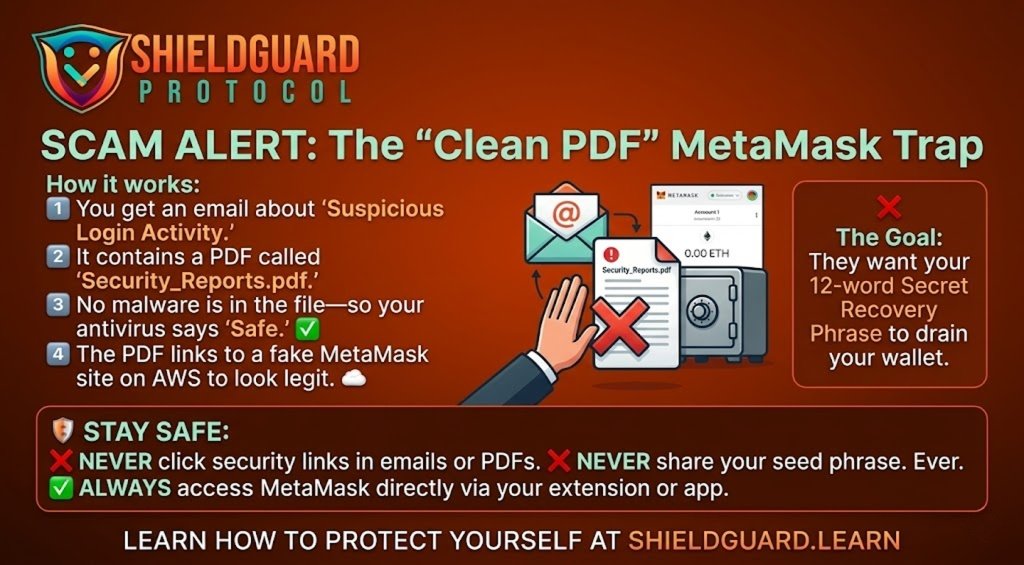
We have detected a sophisticated phishing campaign targeting MetaMask users worldwide. Unlike traditional scams that use malicious files, this attack uses “clean” PDF documents to bypass your email’s security filters.
🔍 How the Scam Works (The Vector)
- The Hook: You receive an email warning of “Suspicious Login Activity” on your MetaMask account.
- The Lure: The email includes a PDF attachment named
Security_Reports.pdf. - The Bypass: Because the PDF is generated using a legitimate Python library (
ReportLab) and contains no malware or viruses, standard antivirus and email scanners (like Gmail or Outlook) often mark it as “Safe.” - The Social Engineering: The PDF looks like a professional security incident report. It instructs you to “Enable 2FA” or “Verify your Identity” to secure your funds, providing a link to a “Security Portal.”
- The Final Trap: The link leads to a fake MetaMask website hosted on Amazon Web Services (AWS) infrastructure. This makes the URL look legitimate (e.g.,
s3.amazonaws.com/...). Once there, you are asked to enter your 12-word Secret Recovery Phrase.
🚩 Red Flags to Watch For
- Unsolicited Security Alerts: MetaMask never sends unsolicited emails. They do not have your email address unless you have explicitly provided it for a support ticket.
- Requests for Your Seed Phrase: No legitimate crypto wallet, support agent, or “security update” will ever ask for your Secret Recovery Phrase.
- Links in PDFs: Be extremely wary of any PDF that asks you to click a link to “fix” a security issue.
🛡️ Preventive Education: How to Protect Yourself
- Verify the Sender: Always check the actual email address, not just the display name. Legitimate MetaMask support only comes from
@metamask.io. - Go to the Source: If you are worried about your account security, never click a link in an email. Instead, open your MetaMask browser extension or mobile app directly. If there is a real issue, you will see a notification inside the app.
- Use Hardware Wallets: For significant holdings, use a hardware wallet (like Ledger or Trezor). This ensures your private keys never touch an internet-connected device, making them immune to these fake websites.
- Enable 2FA on Your Email: Since many crypto-related accounts are linked to your email, ensure your email itself is protected by a hardware security key (like a YubiKey) or an authenticator app.
ShieldGuard Reminder: Your Secret Recovery Phrase is the “Master Key” to your money. If you share it, your funds are gone forever. Stay Alert. Stay Protected.