🚨 Scam Report: The “Smart Wallet” Trap on Base Chain
Threat Type: Account Abstraction / Session Key Phishing. Target: Coinbase Smart Wallet Users & Base Chain Adopters
Risk Level: 🔴 CRITICAL (Total Wallet Control)
Executive Summary
A sophisticated new phishing campaign is targeting users of the Coinbase Smart Wallet and the Base L2 ecosystem. Attackers are exploiting the very features designed to make crypto easier—Account Abstraction (AA)—to steal funds.
Unlike traditional scams that require you to sign a “Send” transaction for every theft, this attack tricks you into signing a “Session Key.” Once signed, the attacker can drain your wallet at any time in the future without asking for your permission again.
Anatomy of the Attack
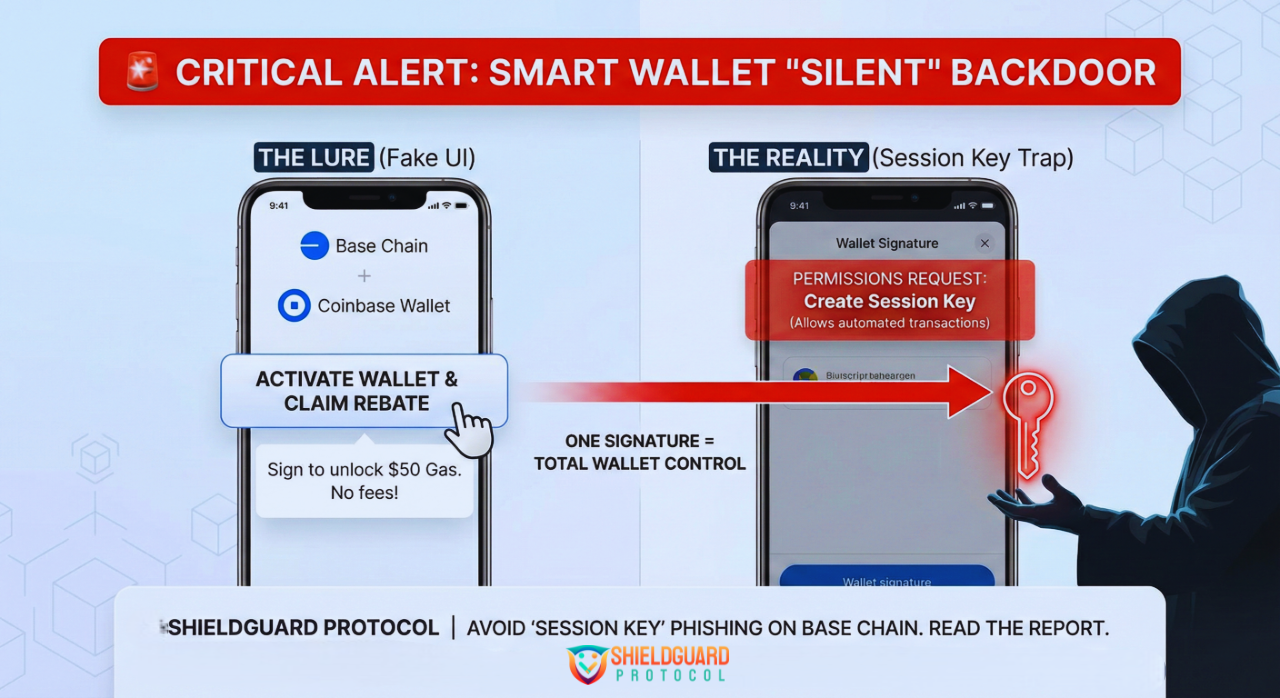
1. The Lure (The “Activation” Lie)
Users receive an email, a DM, or see a promoted ad claiming:
- “Action Required: Activate your Base Smart Wallet to enable gasless transactions.”
- “Claim your $50 in Base Gas Rebates.”
- “Migration Alert: Update your Smart Account permissions.”
These messages direct users to a high-quality phishing site that mimics the official Coinbase or Base interface.
2. The Technical Trap (Session Keys)
Smart Wallets use a technology called Account Abstraction, which allows for “Session Keys.” A Session Key is like a temporary “hall pass”—it lets an app sign transactions on your behalf for a set period so you don’t have to click “Approve” constantly (great for gaming or trading).
The Scam:
The phishing site asks you to “Sign to Connect” or “Verify Wallet.”
- What you think you are doing: Logging in.
- What you are actually doing: Signing a permission slip that assigns a Session Key to the attacker.
3. The “Silent Drain”
Once the attacker holds that Session Key, they become an authorized “signer” on your Smart Wallet. They can execute transfers, approve tokens, and drain assets in the background. You will not receive a wallet popup or confirmation request because you already gave them permission.
🛡️ ShieldGuard Preventive Education
Smart Wallets are the future of crypto UX, but they require a new kind of vigilance.
1. The “No Activation” Rule
Smart Wallets (like Coinbase Smart Wallet) are self-custodial. You do not need to “activate” them via a third-party website, and you certainly don’t need to “migrate” them to receive rebates.
- If a website asks you to sign a transaction just to “log in” or “activate,” close the tab immediately.
2. Read the “Permissions” Request
When signing a transaction on a Smart Wallet, look closely at the permission details.
Safe: “Sign Message” (usually harmless for login).DANGER: If the prompt mentions “Create Session,” “Delegate,” or “Add Signer,” STOP. This is granting control of your wallet to the website.
3. Audit Your Sessions
Just like you check “Connected Apps” on traditional wallets, you must regularly check active sessions on Smart Wallets.
- Go to your Smart Wallet settings.
- Look for “Sessions” or “Keys.”
- Revoke any session that you do not recognize or that is associated with a dApp you are no longer using.
ShieldGuard Verdict:
“Technology like Account Abstraction makes crypto easier for you, but it also makes it easier for scammers to hide. In 2026, a signature isn’t just a transaction—it can be a handover of ownership. verify before you verify.”
Stay shielded. ShieldGuard Protocol