🚨 SECURITY ALERT: The “Elusive Comet” Zoom Trap – Silent Hot Wallet Drainer
Category: Social Engineering / Remote Access Exploitation
Threat Level: Critical 🔴
Target: Crypto Founders, High-Value Web3 Investors, OTC Traders
The threat landscape in Web3 is evolving faster than traditional security can keep up. While the industry is hyper-focused on malicious links and poisoned smart contracts, a highly sophisticated threat group dubbed “Elusive Comet” is bypassing software defenses entirely. They are weaponizing the native features of enterprise video conferencing software to seize direct control of victims’ computers and drain their hot wallets in real-time.
Here is the complete ShieldGuard Threat Intelligence breakdown of this zero-download exploit, and the operational security (OpSec) protocols required to defeat it.
🔍 Threat Intelligence: Anatomy of the Exploit
This attack is particularly lethal because it does not require the victim to download a .exe file, run a terminal script, or sign a malicious blockchain transaction. The attackers exploit human psychology and native application settings.
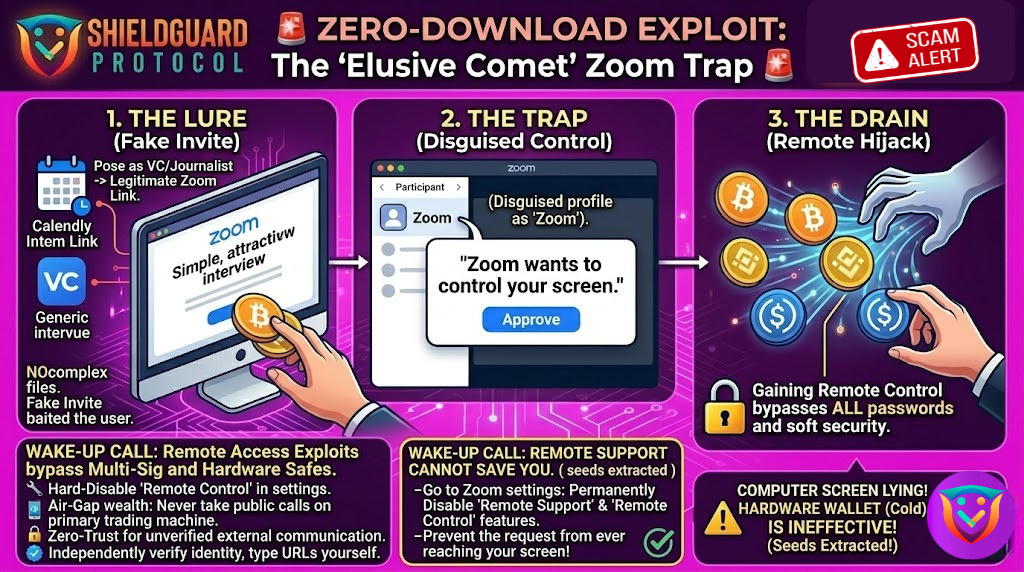
1. The Lure: False Authority
The syndicate initiates contact targeting Web3 founders, developers, or high-net-worth traders. They pose as prominent journalists (frequently using the guise of “Bloomberg Crypto”) or high-level venture capitalists. To build legitimacy, they use standard, trusted scheduling infrastructure like Calendly to set up a formal interview or business meeting via Zoom.
2. The Infiltration: The “System” Prompt
Once the victim joins the Zoom meeting, the attackers do not drop a phishing link in the chat. Instead, they exploit Zoom’s built-in “Remote Control” capability.
- The attacker silently changes their display name in the Zoom meeting to simply “Zoom”.
- They then issue a standard request to control the victim’s screen.
- Because the attacker changed their name, the pop-up on the victim’s screen reads: “Zoom wants to control your screen.”
3. The Killshot: The Silent Drain
Believing this is a standard system notification or a required software permission to share their screen, the victim clicks “Approve.” In that instant, the attacker gains full remote desktop control over the victim’s machine. They immediately execute unauthorized transactions to drain active hot wallets, export private keys, and potentially implant persistent backdoor malware—mirroring the aggressive tactics utilized by state-sponsored actors like the Lazarus Group.
🛡️ Preventive Education: Securing Your Digital Perimeter
Hardware wallets and complex passwords are automatically rendered useless the moment you hand physical or remote control of your unlocked device to a threat actor. To survive these highly targeted social engineering campaigns, you must implement strict hardware compartmentalization.
Enforce these ShieldGuard OpSec rules immediately:
1. Hard-Disable Remote Control Features
Do not rely on your ability to spot a fake prompt in the heat of a meeting. Go into your Zoom web portal settings (and the settings of any other conferencing software like Microsoft Teams or Google Meet) and permanently disable the “Remote Control” and “Remote Support” features. Prevent the request from ever reaching your screen.
2. Air-Gap Your Wealth (The Ultimate Rule)
Never, under any circumstances, take public-facing video calls, podcast interviews, or pitch meetings on the same machine that houses your hot wallets, browser extensions (like MetaMask), or sensitive project infrastructure. You must maintain a dedicated, clean device strictly for unverified external communications.
3. Zero-Trust Verification
A Calendly link and a LinkedIn profile do not equal verified identity. If a major publication or VC reaches out to you, do not engage through the links they provide. Independently verify their identity by reaching out to the organization’s official domain or known representatives via a secondary, secure channel.
4. Read Every Permission Prompt Critically
Operating systems and software applications rarely ask for dynamic, mid-session control of your entire computer unless you explicitly initiated a tech support session. Train yourself to pause and physically read every word of a permission pop-up before blindly clicking “Agree” or “Allow.”
💡 The ShieldGuard Verdict
The “Elusive Comet” campaign proves that threat actors no longer need to find a vulnerability in a blockchain’s code; they only need to find a vulnerability in your daily workflow. By weaponizing trust and standard corporate software, they bypass millions of dollars in cybersecurity infrastructure.
True security in Web3 is not just about auditing smart contracts; it is about absolute vigilance in your personal operational security. Build your defenses, compartmentalize your risk, and utilize the full suite of ShieldGuard Learn resources to stay one step ahead of these syndicates.
Stay Verified. Stay Shielded.