🚨 SECURITY ALERT: The “TradingClaw” Trap – Needle Stealer Malware Hijacking Crypto Browsers
Category: Malware / Infostealer / Browser Hijacking
Threat Level: Critical 🔴
Target: Web3 Traders, TradingView Users, Self-Custody Wallets
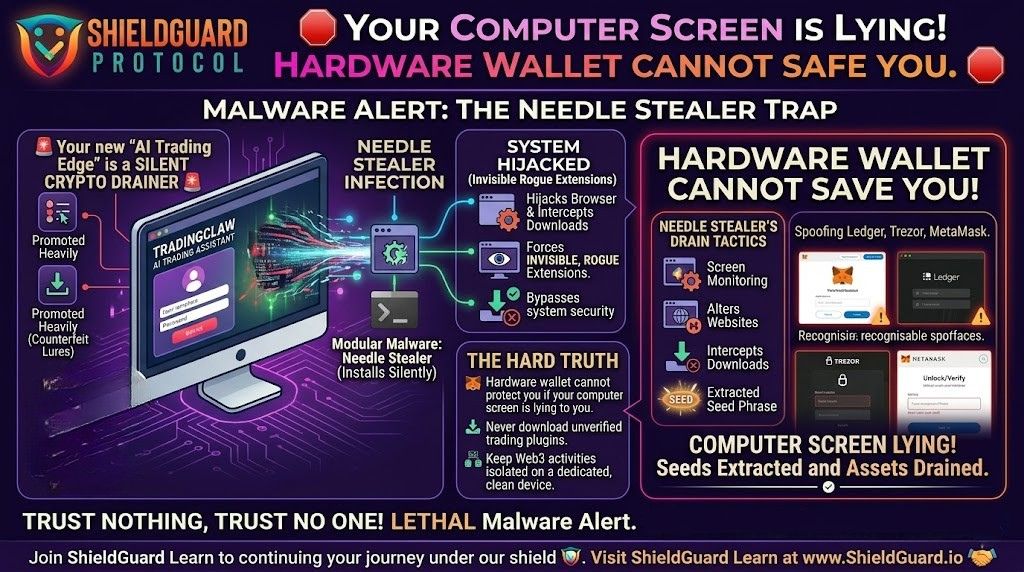
Threat actors are aggressively targeting the trading community by weaponizing the current hype around artificial intelligence. A highly dangerous, modular malware known as Needle Stealer is currently spreading across the web, disguised as an AI-powered trading assistant.
Once this malware infiltrates your machine, it doesn’t just steal your passwords—it takes complete control of your browser, intercepts your downloads, and actively spoofs your hardware wallets to drain your crypto.
Here is the complete ShieldGuard Threat Intelligence breakdown of how the Needle Stealer operates and the critical OpSec rules you must implement immediately.
🔍 The Threat Vector: Hiding in the “AI Edge”
The developers behind Needle Stealer have designed a sophisticated, multi-stage infection chain that preys on a trader’s desire for better market analytics.
1. The Lure: Fake AI Assistants
Attackers have deployed highly convincing counterfeit websites, specifically promoting a fake tool called TradingClaw (tradingclaw[.]pro). It is falsely advertised as an advanced AI assistant for the legitimate TradingView platform. (Note: This is completely unaffiliated with the real TradingView or legitimate startups with similar names). The attackers use smart filtering to hide the malicious site from security researchers while showing the trap directly to targeted traders.
2. The Silent Infection (DLL Hijacking)
If a user falls for the lure and downloads the provided ZIP archive, they trigger the infection. The malware bypasses standard security using “DLL Hijacking” and “Process Hollowing.” In simple terms, it disguises itself as a trusted Windows file (iviewers.dll) and injects its malicious code directly into a legitimate Microsoft process (RegAsm.exe).
3. The Core Drain: Spoofing & Extraction
Once embedded in your system, the Needle Stealer core module activates. It is built in Golang and specifically hunts for Web3 assets:
- Desktop Wallet Spoofer: It actively targets installed instances of hardware and software wallets, including Ledger, Trezor, and Exodus.
- Browser Wallet Spoofer: It attacks MetaMask and Coinbase extensions, deploying fake overlays to extract your master seed phrases.
4. The Hijack: Malicious Browser Extensions
The most lethal aspect of Needle Stealer is its ability to silently force-install a malicious, invisible browser extension (often disguised with Google-related names). This rogue extension grants the attacker terrifying capabilities:
- Real-Time Manipulation: It monitors the websites you visit and can seamlessly redirect you to phishing sites or alter the content you see on the screen.
- Download Replacement: If you try to download a legitimate crypto app, the extension cancels it and replaces it with a malicious file from the attacker’s server.
Full Data Exfiltration: It vacuums up your browsing history, active session cookies, and passwords, sending them to remote Command-and-Control (C2) servers.
🛡️ Preventive Education: Securing Your Trading Environment
A hardware wallet like a Ledger or Trezor is only as secure as the environment it operates in. If your screen is lying to you because your browser is hijacked, your physical device will blindly sign away your assets.
Enforce these ShieldGuard OpSec rules to protect your digital vault:
1. Verify Your Software Sources
Never download trading plugins, mods, or AI assistants from unverified third-party websites. If a tool claims to integrate with TradingView or a decentralized exchange, verify its existence on the official platform’s integration directory before clicking download.
2. Audit Your Browser Extensions Routinely
Needle Stealer hides its rogue extensions in your local app data. Regularly type chrome://extensions/ (or your browser’s equivalent) and scrutinize every installed extension. If you do not recognize an extension, or if it claims to be a “Google Service” but looks suspicious, remove it immediately.
(Advanced Tip: Check the folder %LOCALAPPDATA%\Packages\Extensions on Windows for hidden malicious scripts).
3. Isolate Your Trading Machine
Do not use the same computer for downloading experimental AI software that you use to access your primary Web3 assets. True OpSec requires compartmentalization. Keep a dedicated, clean device strictly for interacting with your hardware wallets and decentralized exchanges (DEXs).
🚨 Emergency Response: If You Suspect Infection
If you downloaded TradingClaw or a similar unverified trading tool, you must act with extreme speed to save your portfolio:
- Quarantine: Do not attempt to log into your crypto accounts from the infected machine.
- Evacuate: Use a completely different, clean device (like your mobile phone on a cellular network) to immediately move your crypto funds to a brand-new hardware wallet or secure vault.
- Sever Access: From the clean device, sign out of all active sessions across your email, exchange accounts, Discord, and Telegram. Immediately change all passwords and reset your 2FA tokens.
- Purge: Run a deep malware scan (using tools like Malwarebytes) on the infected machine, or preferably, execute a complete operating system wipe and reinstall.
💡 The ShieldGuard Verdict
The Needle Stealer campaign is a stark reminder that threat actors are targeting the human element. They know you won’t give them your seed phrase directly, so they use fake AI tools to hijack your browser and manipulate your screen until you do.
Self-custody means you are your own bank’s IT security department. Trust nothing, verify everything, and never let your guard down for the promise of a “trading edge.” Continue building your defensive knowledge with ShieldGuard Learn to ensure you never become exit liquidity.
Stay Verified. Stay Shielded.