🚨The “Session Hijacking” Attack – When 2FA Isn’t Enough
In the evolving landscape of cybercrime, hackers have developed methods to bypass even the most robust standard security measures. One of the most dangerous and increasingly common threats is Session Hijacking (also known as Cookie Theft).
This sophisticated attack vector allows criminals to access your accounts without knowing your password or needing your 2FA code, rendering standard SMS or App-based authentication useless.
1. The Anatomy of the Scam
Session Hijacking campaigns often target high-value users by leveraging their desire for advanced trading tools or software.
- The Bait: High-quality, convincing advertisements or social media posts promising “Free Premium” versions of expensive financial software (e.g., charting tools, trading terminals) or “Cracked” versions of popular programs.
- The Trap: The user is directed to a professional-looking website to download an
.exeor.zipfile. This file contains an Info-Stealer Trojan (such as “RedLine Stealer”). - The Theft: Once the file is executed, the malware silently scans the victim’s browser in seconds, stealing Session Cookies, saved passwords, and autofill data.
2. The Mechanism: How They Bypass 2FA
The most terrifying aspect of this attack is that it completely sidesteps the login process.
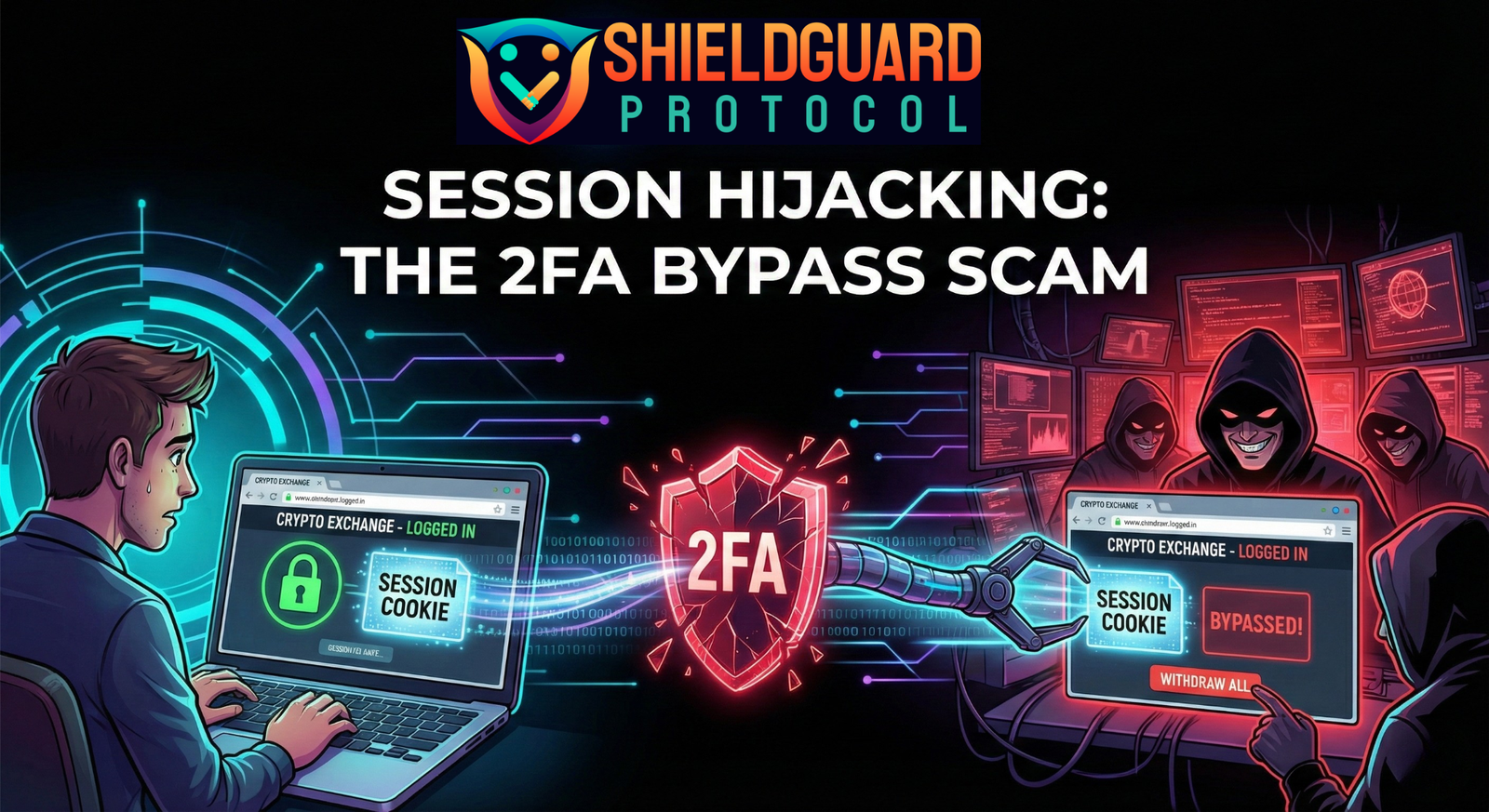
- The “Session Cookie”: When you log in to an exchange or email provider and enter your 2FA code, the server verifies you and places a Session Cookie in your browser. This digital “pass” tells the website, “This user is already verified; keep them logged in.”
- The Hijack: The malware steals this valid “pass.” The hacker then loads this stolen cookie into their own browser.
- The Bypass: When the hacker navigates to the exchange, the website sees the valid cookie and assumes it is you. The hacker is granted immediate access as a “logged-in user” without ever seeing a password prompt or 2FA screen.
3. Why It Is Hard to Detect
Because the hacker is using your valid session token, their activity mimics your own “trusted” behavior.
- Trusted Device Status: To the exchange’s security systems, the traffic appears to originate from an already authenticated session, often bypassing “New Device” alerts.
- Stealthy Draining: Hackers often perform multiple small withdrawals to avoid triggering “Big Transaction” manual reviews or security flags.
🛡️ SHIELDGUARD SECURITY GUIDELINES: Defending Against Session Hijacking
1. The “Clean Machine” Rule (Gold Standard)
- Guideline: Never trade or access crypto exchanges on the same computer you use for casual browsing, gaming, or downloading software.
- Action: Ideally, maintain a dedicated, clean device (like a Chromebook or a fresh Windows install) exclusively for financial transactions. Install strictly necessary software only.
2. Upgrade to Hardware 2FA
- Guideline: Standard App-based 2FA (Google Auth) protects against password theft but is vulnerable to cookie theft.
- Action: Transition to a Hardware Security Key (YubiKey/FIDO2). These physical keys bind the session to the specific hardware device, making it significantly harder for a remote attacker to replicate the session even if they have the cookie.
3. Zero Trust for “Free Premium” Software
- Guideline: There is no such thing as a free version of premium financial software. These are the primary distribution vectors for Info-Stealer malware.
- Action: If an ad offers paid tools for free, treat it as a malicious attempt and report it.
4. Strict Session Hygiene
- Guideline: Do not stay logged in indefinitely.
- Action: Log out of your crypto exchanges and email accounts immediately after you finish your tasks. Logging out destroys the active Session Cookie, rendering it useless if it is stolen later.
🚨 Immediate Steps If Compromised
If you suspect you have downloaded a malicious file or notice suspicious activity:
- Assume the PC is Compromised: Do not change passwords on the infected device; the malware will capture the new ones instantly. Use a separate, clean phone or computer.
- Kill Active Sessions: Immediately go to the security settings of your Email and Exchanges on a clean device and select “Sign out of all other sessions” or “Revoke all devices.”
- Factory Reset: The only safe way to remove an Info-Stealer is to perform a complete Factory Reset (wipe) of the infected computer. Antivirus software may not catch all backdoors.