🚨 SHIELDGUARD THREAT INTEL: The TCLBANKER “AI Prompt” Trojan
Status: Active Global Threat
Attack Vector: Trojanized Software & Self-Spreading Worm
Primary Target: 59 Crypto, Banking, and Fintech Platforms
🔍 Threat Analysis: What Happened?
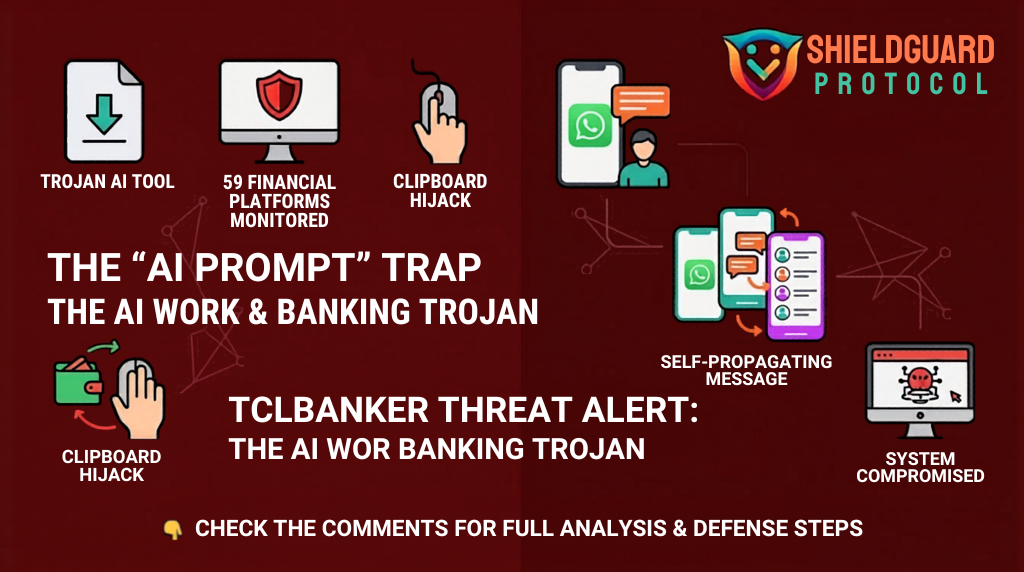
Our intelligence team is tracking a sophisticated new campaign targeting users who are seeking “AI Productivity Tools.” The attack is disguised as an installer for the Logi AI Prompt Builder (a real tool from Logitech).
1. The “Sideloading” Trap:
The hackers take the real, digitally signed Logitech program and bundle it with a malicious file called screen_retriever_plugin.dll. Because the main program is “trusted” by Windows, your computer allows it to run, unknowingly loading the malware into your system memory.
2. The Hijack (WhatsApp & Outlook):
Once inside, TCLBANKER deploys a Worm Module. It scans your computer for active WhatsApp Web sessions and Microsoft Outlook accounts. It then silently clones your session and sends the malware to your entire contact list.
- Why it works: Because the message comes from YOU, your contacts are 4x more likely to click the malicious link.
3. The Theft (Clipboard & Overlay):
The trojan monitors your browser for any of 59 targeted financial sites. When you log in, it creates a Topmost Overlay—a fake window that looks exactly like your bank or wallet.
- It captures your PINs, Passwords, and Seed Phrases.
- It hijacks your Clipboard, so when you copy a crypto address to send funds, it replaces it with the hacker’s address in real-time.
🛡️ PREVENTIVE EDUCATION: The Forward Defense Mindset
This malware is designed to be “invisible” to standard security researchers by checking your location and system health before it activates. To defend yourself, follow these ShieldGuard Core Rules:
1. The “Official Source” Protocol
Never download software—especially “AI Tools” or “Prompt Builders”—from third-party links, ZIP files, or attachments, even if they come from a trusted friend.
- Rule: If you want a tool, go directly to the manufacturer’s official website (e.g., Logitech.com) and download it there.
2. Clipboard Verification (The “Double-Check” Rule)
Since TCLBANKER can change your clipboard data, NEVER trust the “Paste” function for crypto addresses.
- Action: After pasting a wallet address, manually verify the first 5 and last 5 characters against the original source. If they don’t match, your system is compromised.
3. Manage Your Sessions
The “WhatsApp Worm” relies on active, “Remember Me” sessions in your browser.
- Defense: Periodically log out of WhatsApp Web and Outlook on your desktop when not in use. This forces a fresh QR-code or password check and breaks the “Worm’s” ability to clone your session.
4. Watch for “Overlay” Anomalies
If your screen suddenly flickers, or a “Windows Update” or “Bank Verification” screen appears that you cannot minimize or close using the Esc or Windows keys, this is a sign of a Topmost Overlay attack.
- Emergency Action: Immediately disconnect your internet and perform a cold restart of your machine.
🎓 Your digital fortress against crypto scams. > At ShieldGuard Protocol, we are committed to building a safer Web3 for everyone. Our multi-utility ecosystem proactively combats fraudulent practices while providing you the tools to grow your assets in a shielded environment. Secure your future with $SHPRO and gain exclusive access to the next generation of crypto security.
Stay Protected. Stay Shielded. 🛡️✨