🚨 SECURITY ALERT: The NWHStealer Epidemic – Fake VPNs and Gaming Mods Draining Crypto Wallets
Category: Malware / Infostealer
Threat Level: Critical 🔴
Target: Windows Users, Self-Custody Crypto Holders
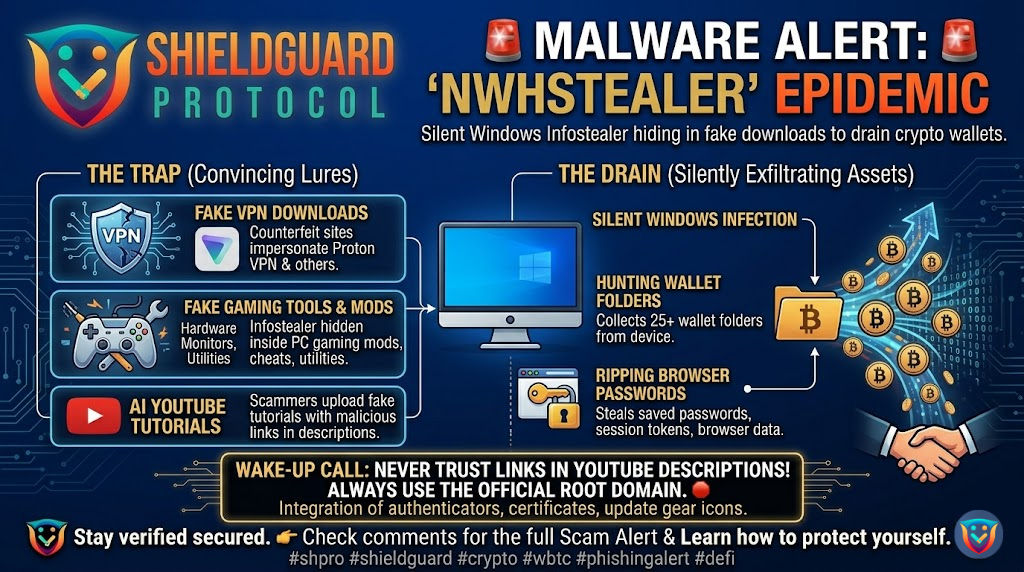
Threat actors are moving far beyond obvious phishing emails. A highly aggressive Windows infostealer, tracked by cybersecurity researchers as NWHStealer, is currently spreading across the web. This campaign is particularly dangerous because the attackers are hiding the malware inside tools and software that Web3 users actively search for and trust.
Once installed, NWHStealer immediately targets your browser data, saved passwords, and actively hunts for cryptocurrency wallet information across your device.
Here is the complete breakdown of how this massive malware campaign operates and the critical OpSec rules you must follow to keep your device clean.
🔍 The Threat Vector: Hiding in Plain Sight
The developers behind NWHStealer are not relying on a single attack vector; they have cast a massive net using highly convincing lures. Here is exactly how the infection chain works:
1. The Bait (The Fake Lures)
Attackers are setting up counterfeit websites and compromised download pages disguised as legitimate software. The most prominent lures include:
- Fake Proton VPN installation websites.
- Hardware monitoring utilities (like OhmGraphite or Sidebar Diagnostics).
- Gaming mods, cheats, and “Lossless Scaling” tools.
- Cryptocurrency mining software.
2. The Distribution Channels
Scammers are aggressively pushing these infected files through platforms you might normally trust. They are utilizing GitHub repositories, SourceForge, and free web-hosting providers. Furthermore, they are deploying AI-generated YouTube videos demonstrating how to install these tools, placing the malicious download links directly in the video descriptions.
3. The Silent Infection
When a user downloads and unzips the file (e.g., OhmGraphite-0.36.1.zip), they unknowingly execute the loader. To bypass antivirus software, NWHStealer uses advanced techniques like “DLL Hijacking” and “Process Hollowing.” In simple terms, the malware disguises itself by injecting its malicious code directly into legitimate Windows processes (like Microsoft’s Assembly Tool) or your active browser (like Chrome or Edge).
4. The Drain (Targeting Your Crypto)
Once active, NWHStealer performs a deep sweep of your system. It specifically enumerates more than 25 folders and registry keys associated with cryptocurrency wallets. It rips encrypted data, session tokens, and passwords right out of your browser extensions, sending your entire digital identity back to the attacker’s command-and-control server.
🛡️ Preventive Education: Securing Your Digital Environment
A hardware wallet adds a massive layer of security, but if your primary computer is compromised by an infostealer, your active browser sessions, hot wallets, and exchange passwords are all up for grabs.
To defend against the NWHStealer and similar malware, you must lock down your downloading habits:
- Never Download from YouTube Descriptions: Threat actors are flooding YouTube with AI-generated tutorials specifically to trick you into clicking malicious links in the description. Treat all software links on YouTube as highly hostile.
- Verify the Root Domain: If you need to download a VPN, hardware tool, or extension, type the official manufacturer’s URL directly into your browser. Do not rely on Google Search ads or third-party review sites, as these are frequently hijacked by fake domains (e.g.,
vpn-proton-setup[.]com). - Audit GitHub and SourceForge Downloads: Just because a file is hosted on GitHub does not mean it is safe. Scammers frequently create fake repositories. Check the publisher details, the repository’s history, and the digital signature of the executable before running it.
- Isolate Your Crypto Workstation: If possible, do not mix your gaming, modding, and general web-browsing activities with the machine you use to manage heavy crypto assets. Using a dedicated, clean device for your Web3 interactions is the ultimate defense against infostealers.
💡 The ShieldGuard Verdict
The NWHStealer campaign proves that bad actors are exploiting our daily software habits to gain access to our digital vaults. A single compromised ZIP file can lead to total financial loss before you even realize your machine is infected.
Your first line of defense is relentless vigilance. We are actively dissecting these distribution networks to ensure you are never caught off guard. Continue upgrading your security knowledge through our active ShieldGuard Learn modules, and join the ShieldGuard Protocol ecosystem to stay one step ahead of the evolving threat landscape.
Stay Verified. Stay Shielded.