🚨 SCAM ALERT: The $9.5M Fake “Ledger Live” App on Apple’s App Store
Category: Hardware Wallet Security / Supply-Chain Attack
Threat Level: Critical 🔴
Target: Ledger Hardware Wallet Users, Apple iOS/macOS Users.
At ShieldGuard Protocol, we constantly remind our community that in Web3, assumed trust is your biggest vulnerability. The illusion that official app marketplaces are impenetrable “safe zones” has been shattered once again.
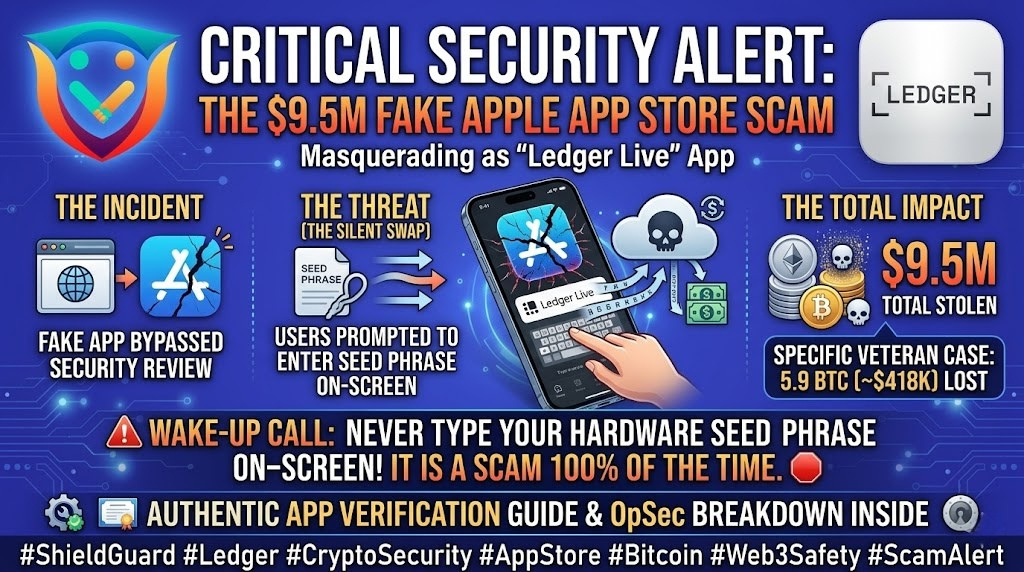
A highly sophisticated malicious application successfully bypassed Apple’s stringent App Store review process, perfectly masquerading as the official “Ledger Live” management app. According to threat intelligence from Hackread, this specific campaign has already drained approximately $9.5 million in user assets.
Here is the breakdown of how this “Silent Swap” attack operates and the critical OpSec rules required to ensure you never fall victim to it.
🔍 The Threat Vector: The “Silent Swap”
This exploit does not rely on a complex smart contract hack or a compromised blockchain protocol. It relies entirely on a breach of trust and a moment of human error.
- The Infiltration: Scammers publish a perfect visual clone of the “Ledger Live” app on the Apple App Store, complete with matching logos and fake positive reviews.
- The Trap: A user buys a new iPhone or Mac, or simply decides to manage their crypto on the go, and searches the App Store for “Ledger Live.” They download the top result, assuming Apple has vetted it.
- The Fatal Error: Upon opening the fake app, the user is presented with a standard-looking “Restore Wallet” screen. The app asks the user to type their 12 or 24-word seed phrase directly into their phone or computer to “sync” the device.
- The Drain: The moment the seed phrase is typed and submitted, it is transmitted directly to the attacker’s server. The hardware wallet is drained instantly.
💥 The Real-World Impact
This exact attack vector is responsible for catastrophic losses across the industry. It is the same methodology that recently caught a crypto veteran off guard, resulting in a devastating loss of 5.9 BTC (approx. $418,000).
When a seasoned investor who has been in the space since 2017 can be wiped out in seconds by a fake Apple Store app, it proves a harsh reality: Being a veteran doesn’t make you untouchable. Only relentless, updated education makes you untouchable.
🛡️ Preventive Education: The Absolute Rules of Hardware OpSec
Hardware wallets are designed to keep your private keys offline. The moment you type those keys into an online device, you have defeated the entire purpose of the hardware.
To protect yourself from App Store spoofing, memorize these absolute rules:
1. The “Never Type” Rule (The Ultimate Defense)
Your Ledger (or Trezor, or Tangem) seed phrase should NEVER be typed into a computer keyboard, a mobile phone screen, or a cloud document. It is only ever meant to be entered directly using the physical buttons on the hardware device itself. If an app asks you to type your seed phrase on your phone screen, it is a scam. 100% of the time.
2. Verify the Developer Entity
Do not just look at the app name and logo. Click on the developer’s name in the App Store. Scammers often use names with slight typos (e.g., “Ledger Offical” instead of “Ledger SAS”).
3. Always Source from the Root
Never search for crypto management apps directly in the App Store or Google Play Store search bars. Always go directly to the manufacturer’s official website (e.g., www.ledger.com) and click the official download links provided there.
💡 The ShieldGuard Verdict
Scammers are banking on the fact that you will let your guard down when using familiar ecosystems like Apple. They are constantly finding new ways to prepare new attacks, which means your knowledge from yesterday cannot protect your assets tomorrow.
You must be prepared to spot these scams on sight and completely destroy their tactics. Stay updated, stick to the absolute rules of OpSec, and let ShieldGuard Protocol’s threat intelligence team watch your back.
Stay Verified. Stay Shielded.