🚨 SCAM ALERT: “JINX-0164” Targets Crypto Teams with Fake Job Offers & macOS Malware
Incident Overview
A highly coordinated and sophisticated threat actor group, tracked as JINX-0164, is actively targeting professionals within cryptocurrency organizations, decentralized applications (dApps), and Web3 development teams. Moving away from traditional automated phishing, these attackers are using hyper-targeted social engineering masked as high-paying employment opportunities to deploy custom malware on macOS devices.
The Mechanics of the Attack
The attack vector relies entirely on psychological manipulation and trust-building before any technical exploit occurs:
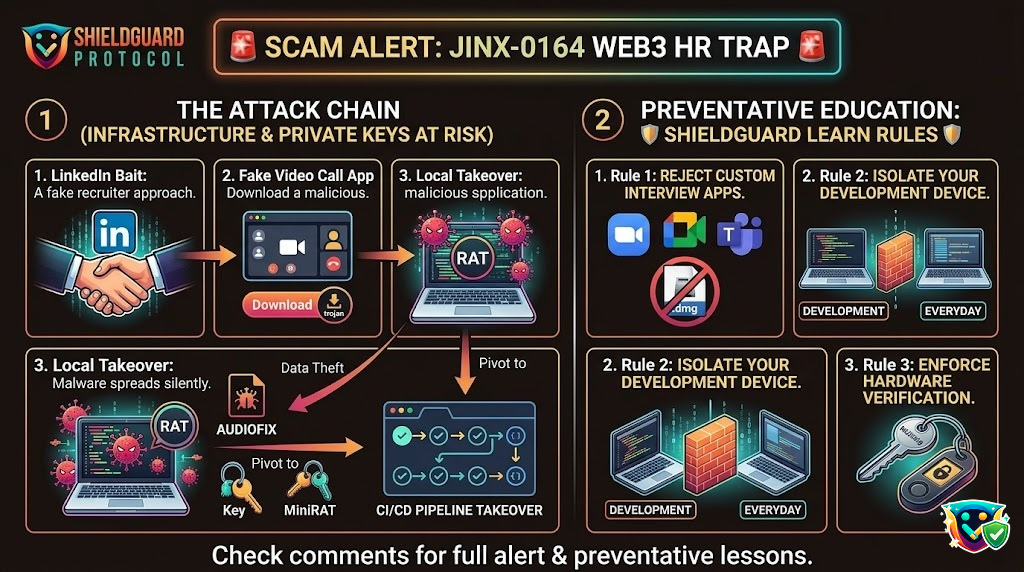
- The LinkedIn Approach: Attackers create highly polished, convincing profiles impersonating legitimate recruiters or tech executives on LinkedIn. They reach out to Web3 developers, project managers, and security teams with attractive, tailored job offers.
- The Interview Trap: Once a conversation is established, the “recruiter” schedules a technical interview. They instruct the victim to download a specific, proprietary video conferencing application or coding assessment tool required for the interview link.
- The Silent Payload: The downloaded application is a trojanized package. Upon execution, it bypasses standard macOS gatekeeper protections to install two distinct, custom payloads: a Python-based infostealer named AUDIOFIX and a Go-based backdoor tracking tool named MiniRAT.
The Impact on Individuals and Organizations
Because Web3 professionals often handle sensitive keys and infrastructure on their local devices, the fallout from a JINX-0164 infection is severe:
- Credential & Asset Theft: The AUDIOFIX malware immediately sweeps the local device, scraping local cryptocurrency wallet files, browser extension data, browser cookies, and saved login data directly from the iCloud Keychain.
- Corporate & Supply Chain Takeover: The MiniRAT backdoor establishes a persistent remote connection to the attacker’s server. From there, the attackers listen in on internal communications and steal source code. In at least one documented instance, they used the infected developer’s machine to pivot laterally into the company’s CI/CD (Continuous Integration/Continuous Deployment) pipeline, injecting malicious code directly into a live product update.
🛡️ SHIELDGUARD LEARN: Preventive Education For Web3 Professionals
When working in the Web3 industry, your personal device hygiene is directly tied to the security of your protocol’s treasury and your community’s safety. Protect yourself from sophisticated recruitment scams with these essential defense rules.
1. Verify and Cross-Reference All Inbound Recruiters
Never take a recruiter’s profile at face value, no matter how professional their headshot or work history looks.
- Verify on Official Channels: If a recruiter claims to represent a prominent Web3 firm, check the official company website’s careers page or contact their human resources team directly via an official email domain to verify the person’s identity and open roles.
- Be Wary of Alternative Communication Platforms: Scammers will quickly try to shift the conversation away from LinkedIn’s monitored platform to external messaging apps like Telegram, Discord, or encrypted emails to share malicious files.
2. Never Download Unvetted Software for an Interview
Legitimate companies almost exclusively use industry-standard communication platforms (like Google Meet, Zoom, Microsoft Teams, or Webex) for interviews.
- Reject Proprietary Tools: If a company insists that you must download a standalone
.dmginstaller, a custom browser extension, or a specialized software package just to join a meeting or complete a quiz, treat it as immediate malware. - Use Web-Based Versions: Whenever possible, choose to open meeting invitations inside a sandbox web browser tab rather than installing a local application to minimize execution privileges on your machine.
3. Isolate Your Work and Personal Crypto Environments
If your role grants you access to smart contract code, deployment environments, or multi-sig administrative keys, your local workstation must be treated like a secure bank vault.
- Separate Devices: Never manage live protocol infrastructure or handle enterprise-level seed phrases on the same laptop you use for everyday web browsing, casual networking, or downloading unverified experimental files.
- Utilize Hardware Wallets & Air-Gapped Environments: Ensure that all high-value administrative capabilities require external verification from physical hardware wallets. Even if an infostealer completely compromises your local iCloud Keychain or browser extensions, it cannot extract keys held securely inside a physical security module.
🛡️ Secure Your Web3 Journey: Join the ShieldGuard Ecosystem Today
The decentralized world moves fast, and navigating it alone can be high-risk. Don’t leave your security to chance. By joining the ShieldGuard Ecosystem, you aren’t just protecting your digital footprint—you are unlocking a premium tier of exclusive member utilities designed to help your assets thrive securely.
As a valued member of our growing ecosystem, you will gain immediate access to major privileges:
- Premium Web3 Education: Unlock complimentary access to limited-edition video modules and masterclasses within ShieldGuard Learn to outsmart the latest network vectors before they strike.
- Passive Income Ecosystems: Gain exclusive entry into curated, thoroughly vetted passive income opportunities designed with safety and sustainable yield in mind.
- ShieldLabs Incubator Airdrops: Be the first in line to receive Free Tokens from next-generation security and Web3 projects launched directly out of our ShieldLabs Incubator.
Ready to ride a safe journey in the Web3 world?