🚨 THREAT ALERT: The macOS “Silent Swap” Exploit & Trojanized Hardware Wallets
The Incident Report
Deep threat intelligence analysis confirms the active deployment of a severe macOS malware variant—an advanced evolution of the Atomic Stealer (AMOS) and SHub families. This is not a standard credential harvester; it is specifically engineered to target hardware wallet users by directly modifying the applications you trust most.
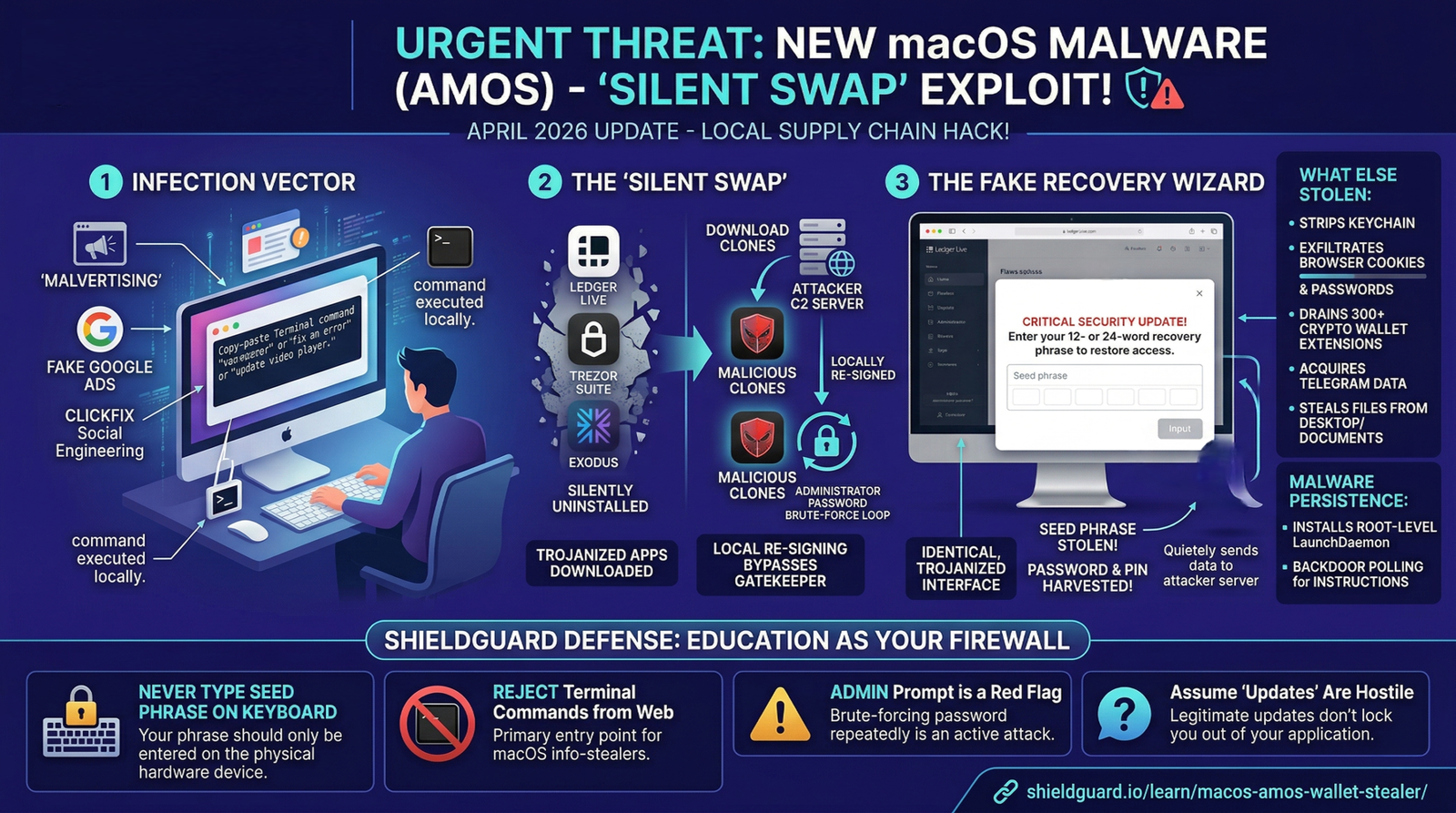
If this malware lands on your Mac, it executes a devastating supply-chain attack locally on your machine. It silently uninstalls your legitimate desktop crypto applications—specifically targeting Ledger Live, Trezor Suite, and Exodus—and replaces them with identical, trojanized clones. It then installs a root-level backdoor that survives system reboots, while simultaneously stripping your macOS Keychain, browser cookies, 300+ wallet extensions, and document folders.
The Anatomy of the Attack: The Local Supply-Chain Hack
This exploit fundamentally breaks the trust model of desktop wallet applications. Here is how the trap is executed:
1. The Infection Vector (The Lure)
The malware typically arrives via malvertising (fake Google Ads for software) or “ClickFix” social engineering. A pop-up tricks the user into copying and pasting a Terminal command to “fix an error,” “update a video player,” or “clear disk space.”
2. The Silent Swap (The Exploit)
Once executed, the malware leverages an infinite Terminal prompt loop to brute-force your macOS administrator password. With elevated privileges, it forces a silent uninstallation of your real Ledger Live or Trezor Suite app. It then reaches out to an attacker-controlled command-and-control (C2) server, downloads a trojanized version of the app, and re-signs it locally to bypass Apple’s Gatekeeper protections.
3. The Fake Recovery Wizard (The Execution)
The next time you open what you believe is your legitimate wallet app, the interface looks flawless. However, the trojanized app presents a highly convincing “Critical Security Update” or “Sync Error” overlay. It prompts you to enter your 12- or 24-word seed phrase or PIN to restore access. The moment you type it, the phrase is sent directly to the attacker’s server, and your hardware wallet is permanently drained. To hide its tracks, it immediately redirects you to the legitimate vendor’s download page.
🛡️ The ShieldGuard Defense: Building Your Human Firewall
As a corporate entity exclusively focused on security education, ShieldGuard Protocol maintains that hardware wallets are only as secure as the human operating them. To defend against trojanized desktop applications, you must adopt these strict Operational Security (OpSec) rules:
- Rule #1: Hardware Wallets NEVER Ask for Seed Phrases on a Keyboard.
The absolute, unbreakable rule of cold storage: Your seed phrase should only ever be entered using the physical buttons on the hardware device itself. If Ledger Live, Trezor Suite, or any desktop interface asks you to type your recovery phrase into your Mac’s keyboard, you are actively being phished. Close the application immediately.
- Rule #2: Reject Terminal Commands from the Web.
Never copy and paste commands into your macOS Terminal from an unverified website, pop-up, or tutorial claiming to “clean your Mac.” This is the primary entry point for modern info-stealers designed to bypass browser sandboxes.
- Rule #3: The Administrator Prompt is a Red Flag.
If your macOS suddenly begins asking for your administrator password repeatedly out of nowhere, assume your system is actively under attack. Do not enter the password to make the prompt go away.
- Rule #4: Assume “Updates” Are Hostile.
Always be intensely skeptical of full-screen overlays demanding immediate action. Legitimate software updates do not lock you out of your application and force a seed phrase entry. If you suspect an app is compromised, delete it and download a fresh copy directly from the official vendor’s verified domain.
Education is the ultimate firewall. Do not let a compromised screen bypass your physical security.