🚨 THREAT ALERT: The “Invisible Blank Check” — Approval Phishing & Silent Wallet Drains
The Growing Crisis Every single day, hundreds of Web3 users wake up to the same nightmare: their wallets have been drained while they were asleep. The most alarming part? Most of these victims have never shared their seed phrases, never saved screenshots of their keys, and use reputable wallets like Trust Wallet or MetaMask.
This is not a failure of wallet encryption; it is the industrial-scale exploitation of the “Approval” mechanism—the foundation of how we interact with DeFi. Threat actors are no longer hunting for your keys; they are tricking you into signing a “Blank Check” that allows them to move your funds at will, weeks or even months after the initial interaction.
The Anatomy of the Attack: How “Silent Drains” Work
To interact with any Decentralized App (dApp), you must grant it permission to “spend” your tokens (e.g., USDT, MATIC, or ETH). Scammers have turned this necessary function into a lethal weapon through two primary scenarios:
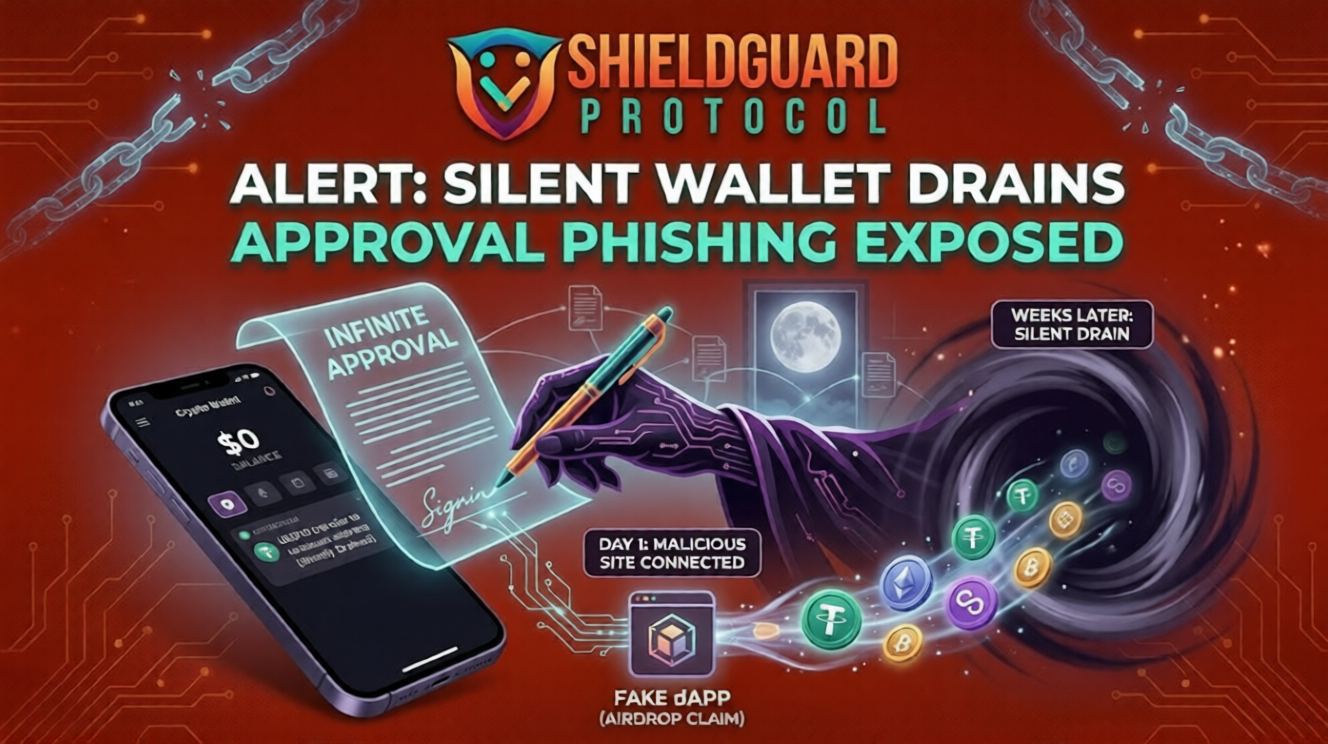
1. The “Infinite Approval” Trap When you connect to a malicious site—often disguised as a free airdrop, a high-yield farm, or a “limited edition” NFT mint—the site prompts you to sign a transaction.
- The Reality: Instead of a simple “Connect” or “Mint,” the smart contract is actually asking for “Infinite Approval” to spend a specific token in your wallet.
- The Execution: Once you click “Approve,” that contract has a permanent, legal right on the blockchain to withdraw your tokens. The attacker doesn’t drain you immediately. They wait for your balance to grow or for a moment when you are inactive (like when you are sleeping) to trigger their withdrawal script.
2. The “Permit2” & Off-Chain Signature Exploit This is a more sophisticated, “gasless” version of the attack.
- The Reality: The attacker presents you with a signature request (EIP-712) that looks like a harmless login or terms-of-service agreement. Because it doesn’t cost gas, users sign it without a second thought.
- The Execution: This signature is actually a “Permit” that grants the attacker’s smart contract permission to move your assets. Since the signature is saved off-chain, the attacker can broadcast it to the blockchain whenever they choose, bypassing your manual oversight completely.
🛡️ The ShieldGuard Defense: Building Your Human Firewall
To protect your capital from these silent exploits, you must move beyond just “hiding your seed phrase.” You must adopt these strict Operational Security (OpSec) rules:
- Rule #1: Treat “Approve” Like a Legal Contract. Never click “Approve” on a site you haven’t thoroughly vetted. If a site asks for permission to spend your stablecoins (like USDT or USDT0) just to view a dashboard or join a “whitelist,” it is an immediate red flag.
- Rule #2: Regularly Audit Your Permissions. Your wallet maintains a “Permission List” of every contract you’ve ever interacted with. Use tools like Revoke.cash or the Polygonscan Token Approval checker at least once a week. If you see an “Unlimited” allowance for a contract you don’t recognize, revoke it immediately.
- Rule #3: The “Burner Wallet” Strategy. Never connect your “Vault” (the wallet where you keep your long-term savings) to any dApp. Use a separate “Burner Wallet” with only a small amount of funds for mints, airdrops, and new DeFi platforms. If the burner is drained, your main capital remains safe.
- Rule #4: Read the Signature, Not the Hype. Before you sign any transaction, scroll down in your wallet’s pop-up and read the “Permission” section. If you see words like “Approve,” “Permit,” or “Allow [Contract] to spend [Token],” ask yourself why that site needs access to your money.
Education is the ultimate firewall. Do not let a single click undo your security.