🚨 SECURITY ALERT: The “DarkSword” iOS Exploit Kit
Category: Mobile Security / Exploit Kits
Threat Level: Critical 🔴
Target: iOS Users (iPhone/iPad) holding cryptocurrency or sensitive data.
At ShieldGuard Protocol, we emphasize that true security doesn’t come from “magic buttons”—it comes from understanding the battlefield. While our recent reports highlighted the “Human Hack” (where users are tricked into giving away access), today we are breaking down a highly sophisticated technical attack that requires almost zero human error: The “DarkSword” Exploit.
Here is everything you need to know about this threat and the operational security (OpSec) steps required to protect your digital assets.
🔍 What is the “DarkSword” Exploit Kit?
Discovered by joint research from security firms iVerify, Lookout, and Google, “DarkSword” is an advanced exploit kit linked to suspected state-sponsored or highly organized hacking groups.
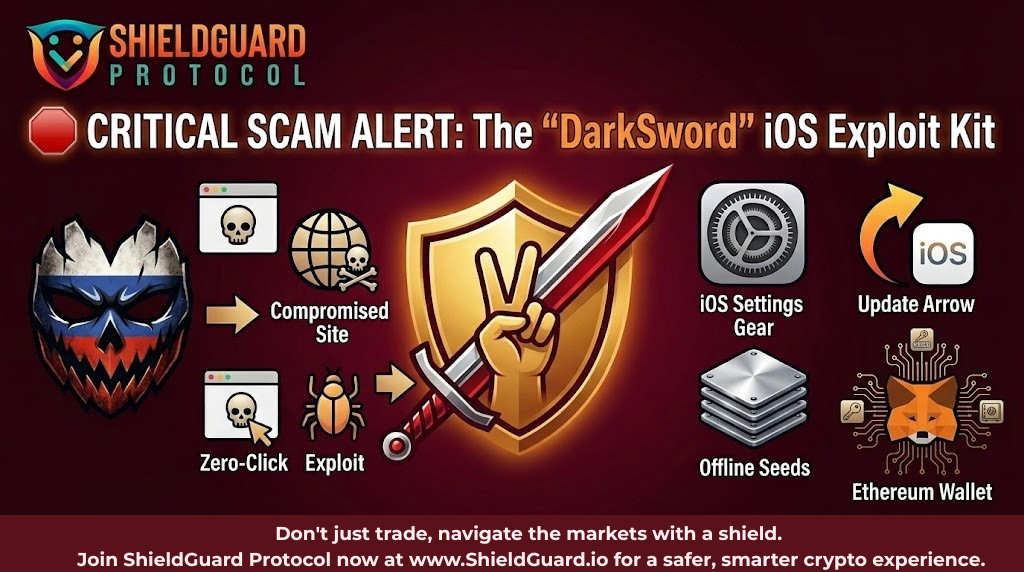
Unlike traditional phishing scams that require you to download a malicious app or manually sign a smart contract, DarkSword executes a drive-by compromise.
⚙️ How the Attack Works
This is not a “Human Hack”—it is a silent, technical breach.
- The Trap: The user simply visits a compromised or malicious website using their iPhone’s browser (Safari, Chrome, etc.).
- The Exploit: Without requiring the user to click “download,” “approve,” or “install,” the site deploys the DarkSword kit in the background.
- The Breach: The malware bypasses the browser’s sandbox and gains deep system access to the iOS device.
💥 The Impact on Crypto Holders
Once DarkSword infiltrates an iOS device, the attacker gains the ability to intercept highly sensitive information. For Web3 users, the consequences are severe:
- Wallet Draining: It can extract private keys and access credentials for mobile hot wallets (like MetaMask, Trust Wallet, or Phantom).
- Password Theft: It logs keystrokes and steals saved passwords from your keychain or browser.
- Message Interception: It accesses secure messages, meaning any Two-Factor Authentication (2FA) codes sent via SMS or stored seed phrases in apps like Apple Notes or iMessage are compromised.
🛡️ ShieldGuard Preventive Defense: How to Protect Yourself
Fortunately, Apple has identified the underlying vulnerabilities DarkSword uses and has issued patches. However, millions of users who delay their updates remain highly vulnerable.
Turn awareness into defense by taking these immediate steps:
1. Update Your iOS Immediately (The Ultimate Fix)
The exploit relies on unpatched vulnerabilities in older iOS versions.
- Action: Go to Settings > General > Software Update and install the latest version of iOS immediately. Turn on “Automatic Updates” to ensure you are never left behind on security patches.
2. Never Store Seed Phrases Digitally
DarkSword targets your device’s internal storage and notes.
- Action: Never save your 12 or 24-word recovery phrases in Apple Notes, Google Keep, email drafts, or take photos of them. Keep them offline on physical paper or metal backups.
3. Isolate Your Crypto Activity
Do not use your primary mobile phone for high-value crypto storage or risky web browsing.
- Action: Use a hardware wallet for your main portfolio. Only keep “spending money” on mobile hot wallets.
4. Exercise Extreme Link Caution
While this is a zero-click exploit once you are on the site, you still have to navigate to the malicious site first.
- Action: Avoid clicking links from unknown senders on X (Twitter), Discord, or Telegram. Only bookmark and use official URLs for DeFi protocols.
💡 The ShieldGuard Verdict
Threats like DarkSword prove that the crypto ecosystem is targeted by highly sophisticated actors. You cannot rely on an antivirus app or a browser extension to save you once a zero-day exploit is deployed. Strong, foundational OpSec—like keeping software updated and utilizing hardware wallets—is your absolute best defense.
Stay Verified. Stay Updated. Stay Safe.