🚨 SCAM ALERT: The “ClickFix” Malicious CAPTCHA (Vidar Infostealer Campaign)
We have detected a sophisticated global campaign known as “ClickFix.” This attack turns a common security tool—the CAPTCHA—into a weapon used to drain crypto wallets and steal private keys.
🔍 How the Scam Works (The Vector)
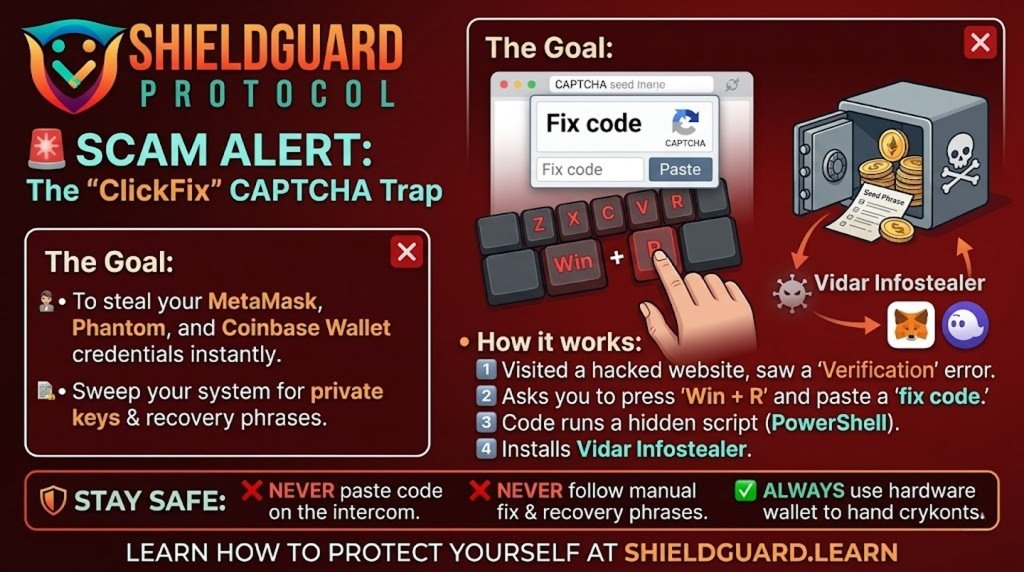
- The Compromise: Attackers hack into legitimate, high-traffic WordPress websites (news outlets, local businesses, blogs).
- The Fake Challenge: When you visit these sites, a professional-looking “Cloudflare” or “Google” verification page appears, claiming you must “Verify you are human” to proceed.
- The Instruction: Instead of clicking “I am not a robot,” the page tells you there is a “technical error” and gives you specific steps to fix it:
Click a button to “Copy the fix code.”
Press Win + R on your keyboard (the Windows “Run” command).
Press Ctrl + V to paste the code.
Press Enter.
- The Silent Execution: By following these steps, you are manually executing a PowerShell or mshta command. This command bypasses all browser security and downloads the Vidar Infostealer.
💀 The Goal: The Vidar Infostealer
Once active, the Vidar malware performs a “sweep” of your entire system, specifically targeting:
- Browser Wallets: It extracts private keys and recovery phrases from extensions like MetaMask, Phantom, and Coinbase Wallet.
- Desktop Wallets: It targets files from Exodus, Atomic Wallet, and Electrum.
- Credentials: It steals saved passwords, session cookies, and 2FA tokens.
- Screenshots: It can take silent screenshots of your desktop to capture visible seed phrases or private data.
🛡️ Preventive Education: How to Protect Yourself
- The Golden Rule: Legitimate websites will NEVER ask you to copy and paste code into your computer’s terminal or “Run” box to solve a CAPTCHA. If you see these instructions, close the tab immediately.
- Disable “Run” if Unnecessary: For non-technical users, system administrators often recommend disabling the
Win + Rshortcut or restricting PowerShell execution policies to “Restricted.” - Use a Hardware Wallet: Storing your assets on a hardware wallet (like Ledger or Trezor) means your private keys never touch your computer’s browser or memory. Even if Vidar infects your PC, it cannot “steal” what isn’t there.
- Clear Browser “Auto-fill”: Avoid saving sensitive passwords or crypto-related credentials in your browser’s built-in password manager.
- Slow Down: Scammers use urgency (often with a 60-second countdown timer) to make you act without thinking. Real security checks don’t have a “ticking clock.”
ShieldGuard Reminder: If a website asks you to do its job by running a “command” on your machine, it’s not a security check—it’s a heist. Stay Alert. Stay Protected.