🚨 SECURITY ALERT: The “CANFAIL” AI Phishing Campaign
Severity: Critical (Advanced Social Engineering & Memory-Only Malware)
Active Vector: Flawless AI-Generated Emails, Google Drive Links
Target Audience: All Web3 Users, Founders, and Institutional Investors
Executive Summary
Google Threat Intelligence Group (GTIG) has just exposed a sophisticated new cyber campaign deploying a malware strain known as CANFAIL.
While initially utilized by suspected state-sponsored actors targeting Eastern European defense and energy sectors, the tactics used in this campaign represent a massive escalation for the entire cybersecurity landscape. Attackers are successfully weaponizing Large Language Models (LLMs) to write flawless, highly tailored phishing emails that bypass traditional spam filters and human skepticism.
The Anatomy of the Attack
The CANFAIL campaign relies on a four-step psychological and technical trap. Here is exactly how the attack is executed:
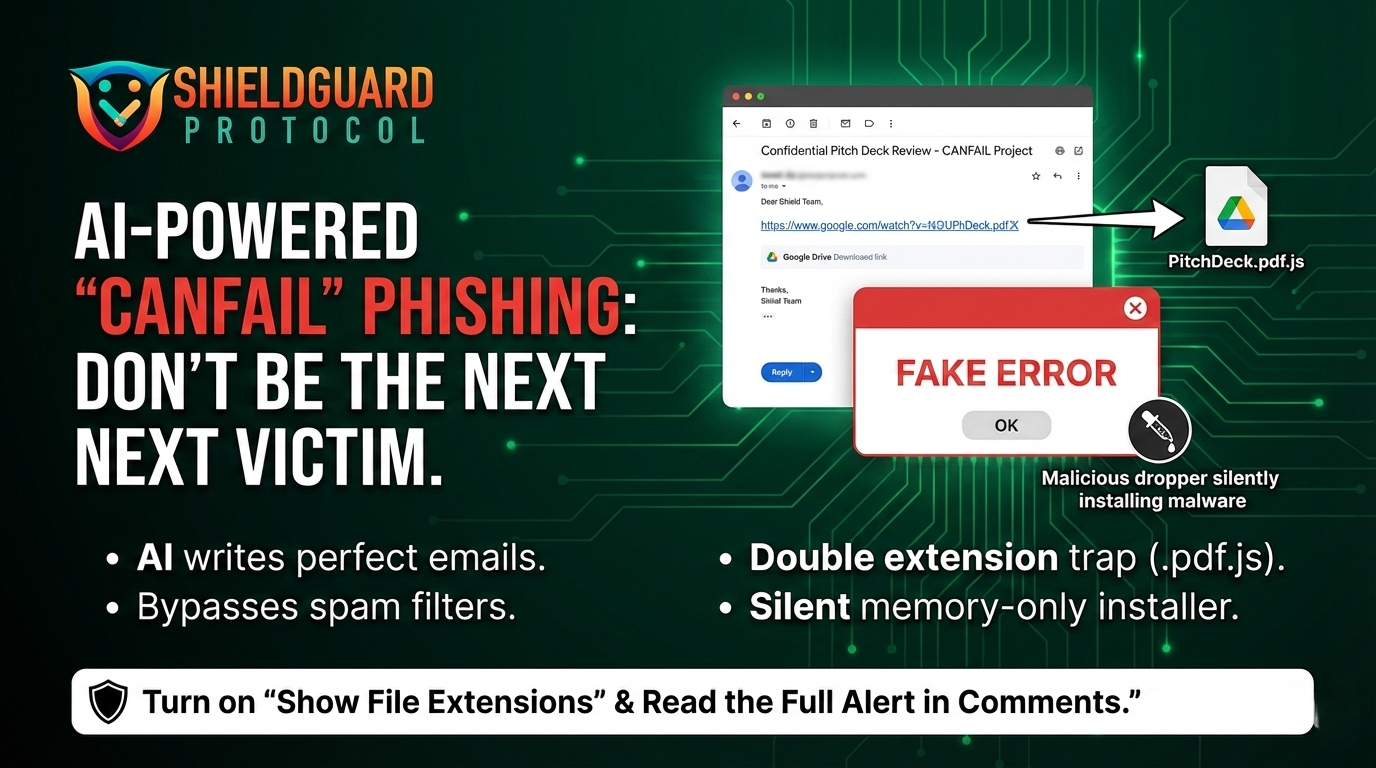
1. The “Flawless” AI Lure
Scammers are using AI to conduct deep reconnaissance on targets and generate highly formal, contextually perfect emails. The days of spotting a phishing email through bad grammar or weird formatting are over.
2. The Google Drive Bypass
To avoid email security scanners that block malicious attachments, the attackers do not attach the virus directly. Instead, they include a standard Google Drive link. Because Google Drive is a trusted, legitimate domain, the email lands directly in your primary inbox.
3. The Double-Extension Trap (.pdf.js)
The Google Drive link hosts a RAR archive containing the CANFAIL malware. To trick the user into executing it, the file is disguised with a double extension, such as Q1_Financial_Report.pdf.js. If a user’s operating system hides known file extensions by default, they will only see Q1_Financial_Report.pdf.
4. The Fake Error & The Silent Dropper
When the victim clicks the fake PDF, CANFAIL (which is actually obfuscated JavaScript) executes. It immediately triggers a fake “Error” pop-up on the screen. While the user is distracted, assuming the PDF is simply corrupted, a PowerShell script runs silently in the background, downloading a “memory-only dropper” that leaves almost no footprint on the hard drive while it hunts for sensitive data and credentials.
Why This is a Web3 Emergency
For the crypto industry, this vector is devastating. Web3 founders, investors, and traders constantly share pitch decks, whitepapers, and tokenomics spreadsheets via Google Drive.
If a memory-only credential stealer infects your machine, it can scrape your browser session cookies (bypassing 2FA on centralized exchanges) and extract private keys from browser extension wallets before your antivirus even realizes an attack occurred.
🛡️ ShieldGuard Preventive Education: The CANFAIL Protocol
To protect your ecosystem and your personal capital from AI-enhanced phishing, implement these ShieldGuard protocols immediately:
- Rule 1: Unhide Your File Extensions
Never trust an icon. Configure your Windows or Mac operating system to “Show all file name extensions.” This will instantly reveal if a supposed .pdf is actually a .js, .exe, or .scr executable file.
- Rule 2: The “Read-Only” Rule for Shared Drives
If you receive a Google Drive link from an external party, preview the document directly within the browser. Do not download the file to your local machine. If the drive forces you to download a RAR or ZIP archive to view a document, delete the email immediately.
- Rule 3: Treat “Errors” as Breaches
If you open a downloaded file and immediately receive a generic “File Corrupted” or “Error Loading” pop-up, assume your machine has just been compromised. Immediately disconnect from the internet and run a full system diagnostic.
The tools of deception have evolved. Your operational security must evolve with them.
– The ShieldGuard Security Team