🛡️ ShieldGuard Learn: The “Approval” Drainer
The “Security Audit” Trap & Why Your Wallet is Your Best Defense
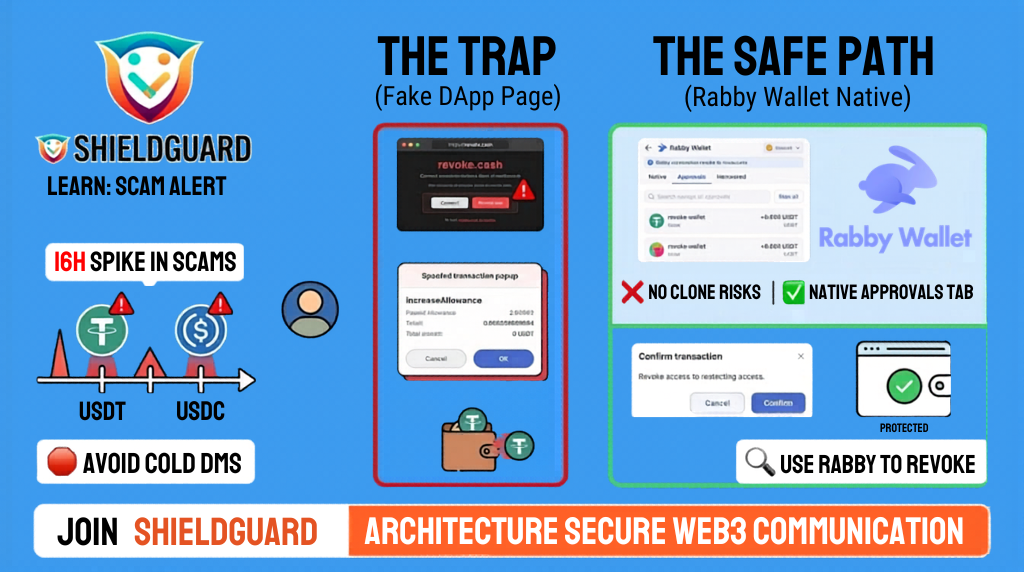
In the last 16 hours, we have seen a massive spike in a particularly cruel scam. Attackers are using social media bots to send “Urgent Security Alerts” to users, claiming their USDT or USDC tether allowance is “at risk.”
The Trap: The Fake Revoke Page
Scammers are directing users to sophisticated clone websites that look like legitimate DeFi dashboards. They tell you to “connect and revoke permissions” to save your funds.
The Technical Reality: Instead of revoking access, the site triggers a signature for increaseAllowance or approve. The moment you sign, you aren’t protecting your wallet—you are giving the hacker a “blank check” to drain your tokens.
ShieldGuard Preventive Guidelines:
- Ignore Cold DMs: A legitimate project will never cold-DM you to warn you about token allowances. If you didn’t initiate the conversation, it’s a scam.
- Beware of Search Ads: Hackers are paying for ads to impersonate sites like
revoke.cash. One wrong click on a “sponsored” link can lead to a total loss. - The “Rabby” Standard: At ShieldGuard, we recommend moving away from connecting your wallet to any external website for permissions management—even the good ones.
🛡️ Pro-Tip: Use Rabby Wallet’s Native Revoke
To stay 100% safe from impersonation, don’t use a browser-based revoke tool. Instead:
- Use the Rabby Wallet desktop or browser extension.
- Navigate to the “Approvals” tab directly inside the wallet app.
- Revoke permissions from within the wallet’s own secure environment.
By doing this inside your wallet, you eliminate the risk of landing on a “clone” website. You aren’t connecting to a third party; you are managing your own security on your own terms.
Stay Shielded. Managing your security shouldn’t feel like a gamble. Join ShieldGuard today and stay protected within an ecosystem that prioritizes your identity and your assets.