🚨 Scam Report: The “Fake Zoom” Malware (Operation BlueNoroff)
Threat Type: Malware / Social Engineering / Deepfake Target: Remote Crypto Workers, Developers, & HR Candidates Risk Level: 🔴 CRITICAL (Total Device Compromise)
Executive Summary
A highly sophisticated malware campaign, attributed to the state-sponsored group BlueNoroff (a subgroup of Lazarus), has resurfaced with a dangerous new variant targeting the Web3 workforce.
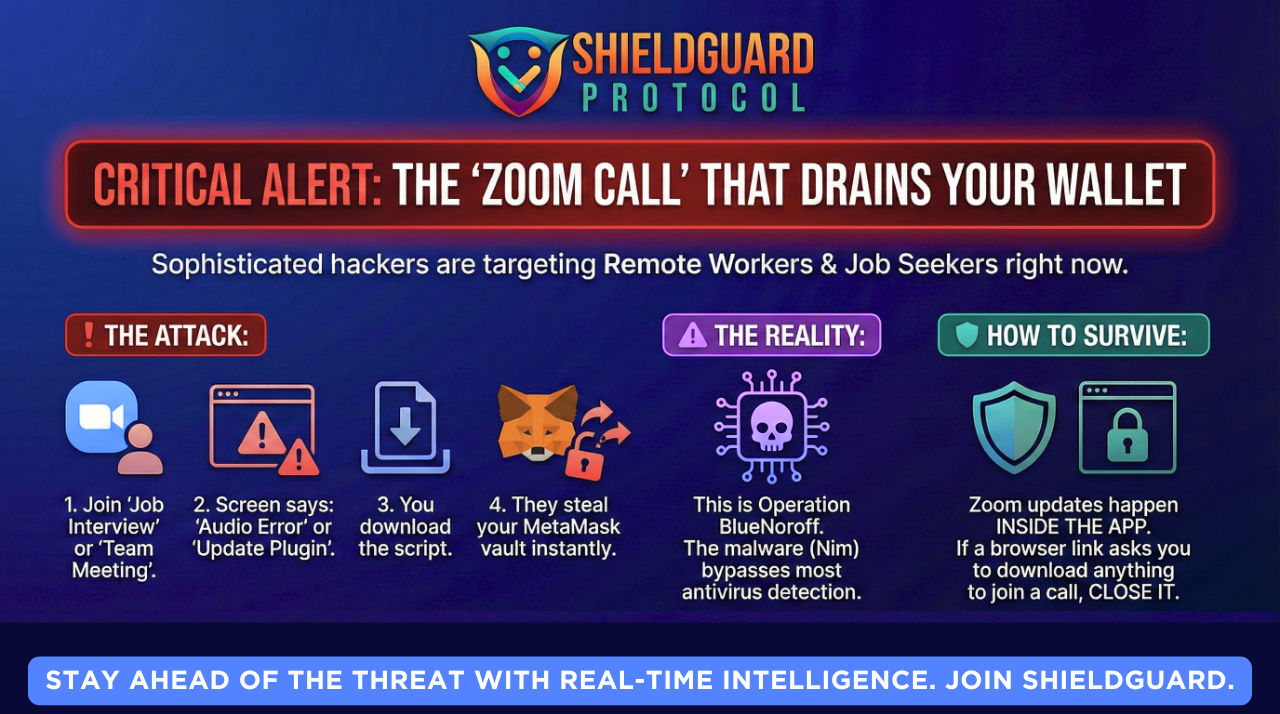
This attack bypasses standard antivirus detection by using a malware payload written in the Nim programming language. It specifically targets remote workers by impersonating “Job Interviews” or “Project Briefings” on Zoom, tricking victims into installing a trojan that instantly steals MetaMask vaults and Browser Cookies.
Anatomy of the Attack
1. The Lure (The “VIP” Meeting) The attack begins on professional networks like LinkedIn or Telegram.
- The Bait: A recruiter or potential partner schedules a call. To lower your guard, they may even use AI Deepfakes of real company executives during the call to prove they are “legit.”
- The Switch: You receive a calendar invite (often via Calendly) that looks standard.
2. The Trap (The “Audio Glitch”) When you click the meeting link, you are taken to a high-quality replica of the Zoom web interface.
- The Trigger: You attempt to join, but the site claims: “Audio driver incompatible” or “Zoom Update Required to join restricted meeting.”
- The Download: A popup asks you to download a script (e.g.,
Zoom_Script_Fix.jsorMeet_Audio_Installer).
3. The Payload (The “Nim” Variant) This is not a standard virus. The malware is written in Nim, a newer programming language that many standard antivirus tools struggle to analyze in real-time.
- What it does: Once executed, it does not lock your computer. Instead, it silently:
- Extracts your Chrome/Brave Cookies (bypassing 2FA on some sites).
Locates and decrypts your MetaMask & Phantom Wallet Vaults (local files).
Sends your Telegram Session Data to the attacker.
🛡️ ShieldGuard Preventive Education
This attack proves that in 2026, “seeing” is no longer “believing.” You can be on a video call with a face you recognize, and it could still be a trap.
1. The “Internal Update” Rule
Zoom, Google Meet, and Microsoft Teams will NEVER ask you to download a script or “driver” from a browser popup to join a meeting.
- Updates only happen inside the desktop application itself.
- Action: If a meeting link asks you to download anything, close the tab immediately.
2. Browser Isolation for Work
Do not mix your “Crypto Life” with your “Meeting Life.”
- Recommendation: Use a separate browser (e.g., Firefox) strictly for video calls and random links.
- Keep your Crypto Wallets (MetaMask/Rabby) on a different browser (e.g., Brave) that is never used for general web surfing or clicking calendar links.
3. The “Extension” Audit
This malware often hides as a fake browser extension.
- regularly check
chrome://extensions. - If you see an extension named “Zoom Scheduler,” “Sheet Reader,” or anything you didn’t install manually—remove it instantly and transfer your funds to a fresh wallet.
ShieldGuard Verdict:
“The ‘BlueNoroff’ group doesn’t hack blockchains; they hack your professional courtesy. They know you don’t want to be late for a meeting, so they weaponize that urgency. In 2026, if a meeting link requires an install, the meeting is the malware.”
Stay shielded. ShieldGuard Protocol