🚨 Scam Alert: The “Google Calendar” Trojan Horse
Threat Type: Infrastructure Phishing / Event Spoofing Target: General Crypto Users & Enterprise Employees Severity: 🔴 CRITICAL (Bypassing Standard Email Filters)
Executive Summary
ShieldGuard Intelligence has detected a rapidly spreading phishing campaign that bypasses traditional email security by attacking a tool users implicitly trust: Google Calendar.
Attackers are injecting malicious events directly into users’ schedules, causing their phones to generate “official” notifications. Because these alerts come from the native Calendar app rather than a suspicious email address, victims are significantly more likely to click the attached links.
The Attack Mechanism: How It Works
This attack exploits the default setting in Google Calendar that automatically adds invitations to your schedule, even from unknown senders.
1. The Injection (The Vector)
Attackers send mass calendar invitations to email lists scraped from crypto databases or public forums. Because these are “Calendar Invites” and not standard emails, they often bypass spam filters and land directly on your daily grid.
2. The Lure (The Notification)
The user wakes up to a push notification on their phone—often 10 minutes before the “event”—creating a sense of urgency. Common titles include:
- “Urgent: Wallet Security Alert”
- “Pending Crypto Invoice: Payment Due”
- “Team Meeting: Q1 Roadmap” (Targeting remote employees)
3. The Trap (The Payload)
When the user opens the event to see what it is, the “Notes/Description” section contains the malicious payload:
- Fake Conference Links: A link labeled “Join Zoom Meeting” or “Google Meet” that actually redirects to a wallet drainer or malware download.
- Vishing Numbers: A “Support Hotline” number. If called, a fake agent will attempt to extract seed phrases or 2FA codes.
Why It Is Effective
- Platform Trust: Users are conditioned to treat Calendar notifications as “verified” tasks or reminders, not spam.
- Mobile UI: On mobile devices, the “Join” link is often prominent, and the sender’s email address is hidden behind a dropdown menu, making it harder to verify the source.
🛡️ ShieldGuard Prevention Protocol
You can stop this attack vector permanently by changing one setting today.
The “Unknown Sender” Fix
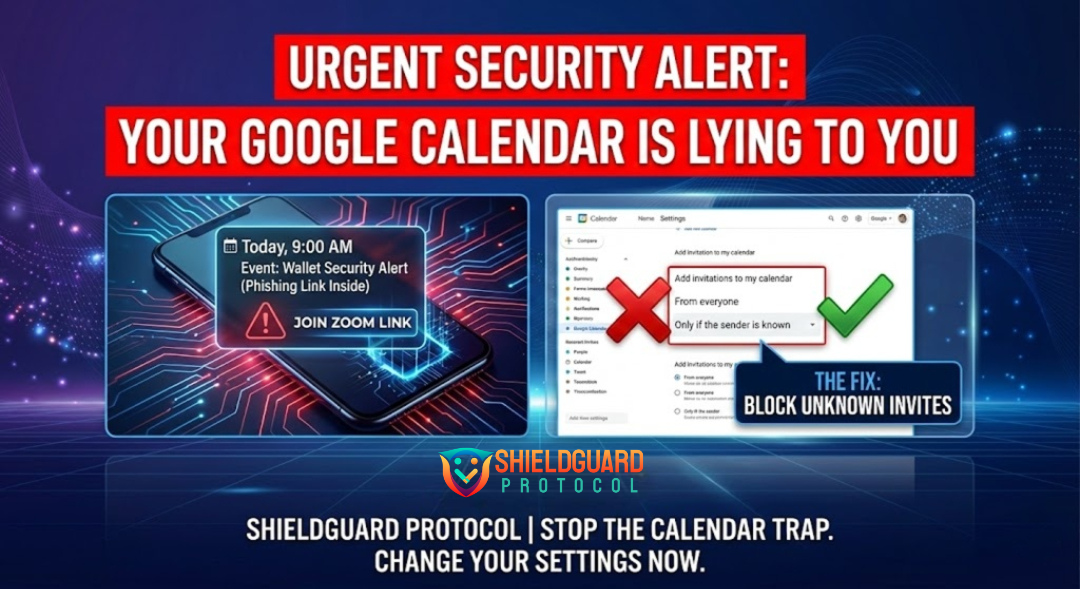
By default, Google allows anyone to put an item on your calendar. Change this immediately:
- Open Google Calendar on your desktop (calendar.google.com).
- Click the Gear Icon (Settings) in the top right.
- In the sidebar, click “Event settings”.
- Find the option: “Add invitations to my calendar”.
- Change it from “From everyone” to “Only if the sender is known”.
This ensures that invites from strangers never appear on your schedule or trigger a notification on your phone.
Immediate Remediation
If you see a suspicious event already on your calendar:
- DO NOT click any links inside the event.
- DO NOT decline the event (this confirms your email is active to the spammer).
- Report as Spam: Open the event options (three dots) and select “Report as Spam.”
Quote of the Day:
“A notification on your phone screen is not a verification of truth. It is just a digital doorbell—always check who is ringing it before you open the door.”
Stay vigilant. Stay shielded. ShieldGuard Protocol